Context sources give chat access to your material in general. Attachments do something narrower: they put one specific thing in front of it for this request.

Attach a file

Click + next to the message box and choose Add photos & files.
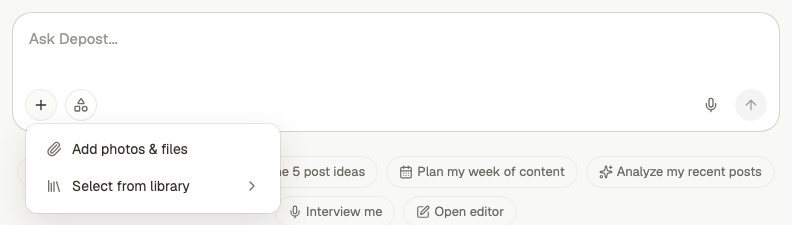
The plus menu open beside the chat message box, showing Add photos and files, and Select from library
Supported formats: Attach a file when the request is about that file — turn this transcript into three posts, pull the findings out of this report, write about the case study in this deck.

Pull in a library document

The same + menu has Select from library, which opens your content library with a search box. Use this instead of re-uploading something you’ve already saved.
Attaching one library document is more precise than switching on the whole Content Library context source. Use the attachment when you know exactly which document matters, and the context source when you want Depost AI to find what’s relevant.
Files that have been brought into a conversation are collected under Files in chat, so you can see what the thread is working from.

Voice input

Dictate instead of typing. The microphone sits at the right of the message box, next to send.


The message box with a Voice input tooltip showing above the microphone button
While you talk, the box becomes a waveform with a running timer. The cross discards the recording. The tick ends it and transcribes what you said.
The message box recording, showing a waveform, a timer reading fourteen seconds, and buttons to discard or accept
The transcription arrives in the message box as editable text, so nothing is sent until you have read it. This is genuinely useful for a specific case: describing an idea out loud usually produces more detail than typing it. If your prompts tend to be one line, try saying the same thing instead — you’ll give Depost AI noticeably more to work with.
1

Press the microphone and talk it through

Say who the post is for, what happened, and what you want the reader to do. Don’t script it.
2

Stop when you're done, and read it back

The tick transcribes. Fix names and technical terms, which are what dictation gets wrong.
3

Send it as the brief

A rambling spoken brief beats a tidy one-line prompt almost every time.

Give chat the right context

Choose which of your material Depost AI draws on.

Library

Save documents once and reuse them across chats.