> ## Documentation Index
> Fetch the complete documentation index at: https://docs.depost.ai/llms.txt
> Use this file to discover all available pages before exploring further.
# Invite your team
> Add people to a workspace, set their role, and control which brands they can reach.
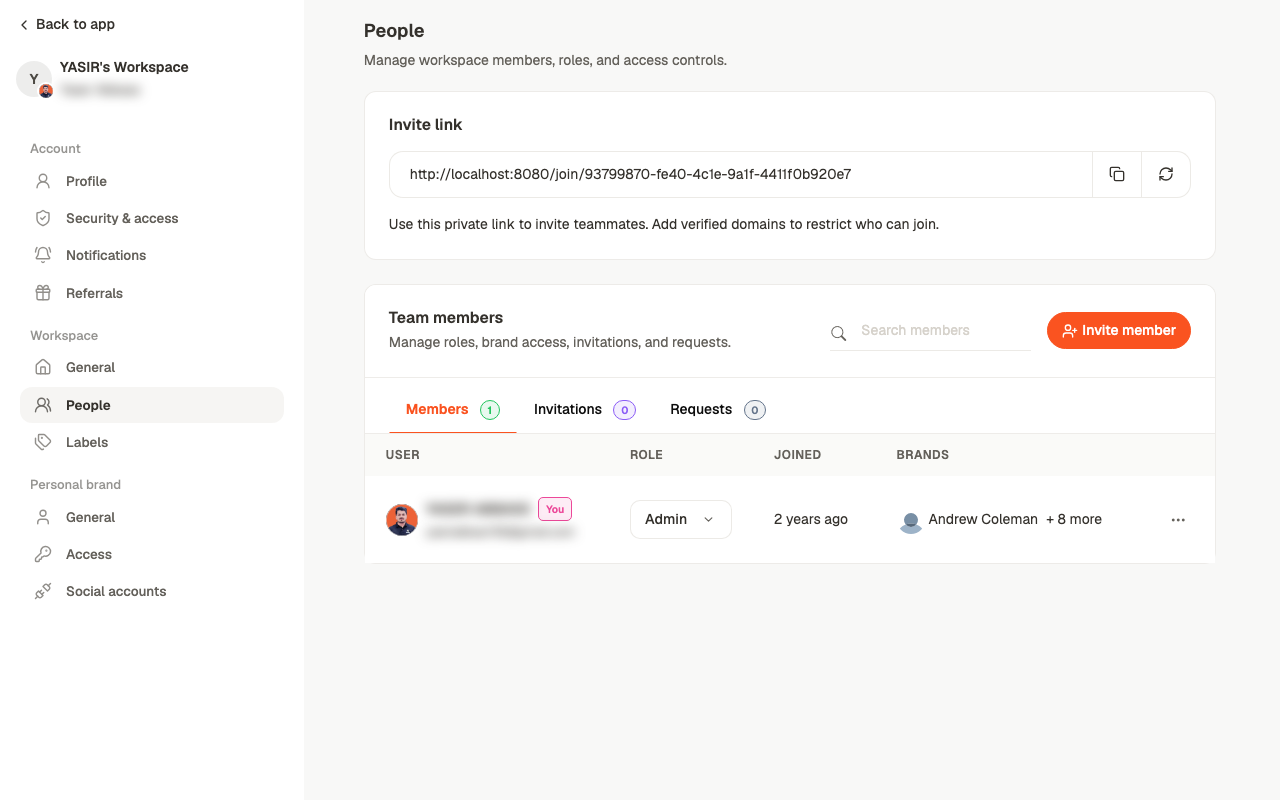
Under **Workspace → People**. Everything about who's in the workspace and what they can do
lives on this one screen.
 ## Two ways to add someone
Invite by email address. They get a link and appear under **Invitations** until they
accept.
A private link anyone can use to join. Copy it, or regenerate it to invalidate the old
one.
The invite link works for anyone who has it. Regenerate it after sharing it anywhere
semi-public, and use verified domains to restrict who can join.
Verified domains are set under **Workspace → General**. With one added, only people on that
email domain can use the link — which is what makes it safe to circulate internally.
## The three tabs
* **Members** — everyone who's in, with their role and brand access
* **Invitations** — sent, not yet accepted
* **Requests** — people asking to join, waiting on approval
Counts on each tab tell you whether anything needs attention without opening them.
## Roles
Each member has a role, changed from the dropdown in the table:
| Role | Can |
| - | - |
| **Admin** | Everything, including settings, billing, and managing people |
| **Editor** | Create and edit content in the brands they can reach |
| **Viewer** | See content without changing it |
## Brand access
The **Brands** column shows which brands each member can work on. This is separate from
their role: an Editor can be an Editor on one brand and have no access to another.
That separation is what makes multi-client work practical — a freelancer can be given one
brand without seeing the rest.
Grant brand access deliberately rather than by default. It's easier to add a brand when
someone asks than to explain later why they could see a client they shouldn't have.
## Related
Why the two layers are separate.
Where everything else lives.
What a reviewer does once they're in.
This documentation is built and hosted on [Mintlify](https://mintlify.com), a developer documentation platform.
## Two ways to add someone
Invite by email address. They get a link and appear under **Invitations** until they
accept.
A private link anyone can use to join. Copy it, or regenerate it to invalidate the old
one.
The invite link works for anyone who has it. Regenerate it after sharing it anywhere
semi-public, and use verified domains to restrict who can join.
Verified domains are set under **Workspace → General**. With one added, only people on that
email domain can use the link — which is what makes it safe to circulate internally.
## The three tabs
* **Members** — everyone who's in, with their role and brand access
* **Invitations** — sent, not yet accepted
* **Requests** — people asking to join, waiting on approval
Counts on each tab tell you whether anything needs attention without opening them.
## Roles
Each member has a role, changed from the dropdown in the table:
| Role | Can |
| - | - |
| **Admin** | Everything, including settings, billing, and managing people |
| **Editor** | Create and edit content in the brands they can reach |
| **Viewer** | See content without changing it |
## Brand access
The **Brands** column shows which brands each member can work on. This is separate from
their role: an Editor can be an Editor on one brand and have no access to another.
That separation is what makes multi-client work practical — a freelancer can be given one
brand without seeing the rest.
Grant brand access deliberately rather than by default. It's easier to add a brand when
someone asks than to explain later why they could see a client they shouldn't have.
## Related
Why the two layers are separate.
Where everything else lives.
What a reviewer does once they're in.
This documentation is built and hosted on [Mintlify](https://mintlify.com), a developer documentation platform.