> ## Documentation Index
> Fetch the complete documentation index at: https://docs.depost.ai/llms.txt
> Use this file to discover all available pages before exploring further.
# Workspaces and brands
> Two layers: the team you work with, and the identities you publish as.
Depost AI separates the **workspace** from the **brands** inside it. Worth understanding
before you invite anyone, because getting it wrong is tedious to undo.
The team. Holds people, billing, labels, and shared library material.
An identity you publish as. Holds its own voice, LinkedIn account, content and analytics.
One workspace can hold many brands. That's the arrangement most people want.
## Which layer holds what
The question to ask is *who or what does this belong to?*
| Belongs to the workspace | Belongs to a brand |
| ------------------------------------ | ------------------------------- |
| People and their roles | Brand voice |
| Billing | The connected LinkedIn account |
| Labels | Posts, ideas and analytics |
| The invite link and verified domains | AI response language |
| Shared library material | Brand-specific library material |
Two that surprise people: **labels are workspace-wide**, so one you create shows on every
brand. **Social accounts are per brand**, because an account publishes as one identity.
## Switching
The switcher at the top of the sidebar changes which brand you're working in. Content is
scoped to whatever is selected — so a post created in the wrong brand is created in the
wrong brand.
Check the switcher before a run of work, and check it in the browser extension separately.
They're set independently, and a bookmark saved against the wrong brand has to be moved by
hand.
## Adding a brand
From the brand switcher, choose **Add personal brand**.
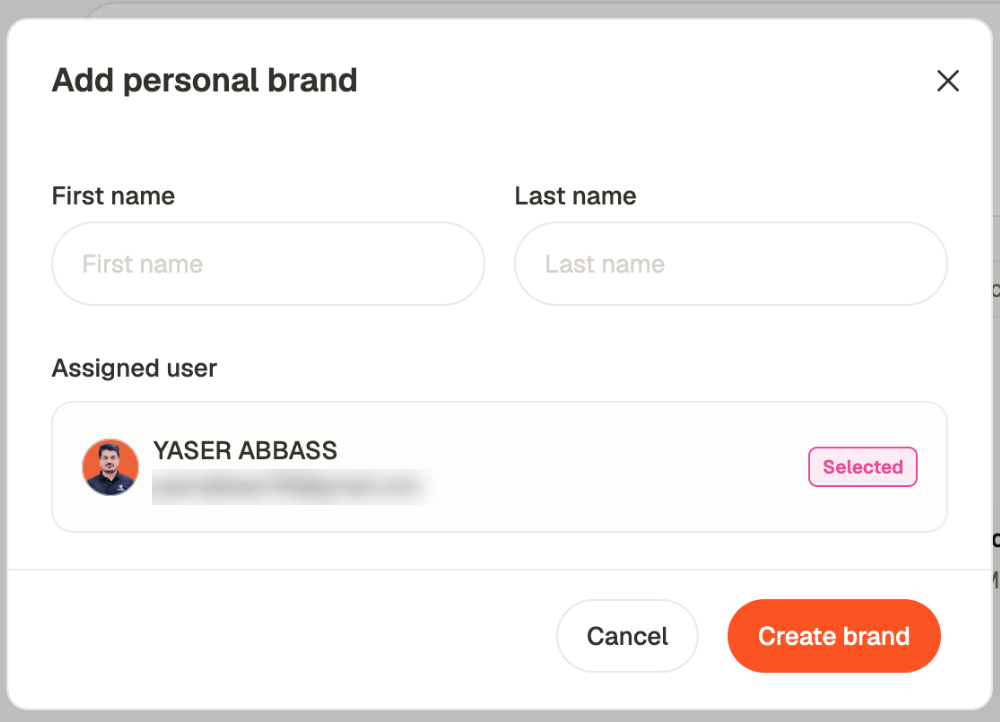 It asks for a **first and last name** — a brand is a person's identity, so that's what it's
named after — and which workspace member it's **assigned** to.
Then it walks the same setup the account itself went through: connect that person's LinkedIn
profile, read their history, build a strategy from it, confirm it. So a second brand isn't a
blank slate. It arrives knowing its own audience and its own voice, and it doesn't inherit
either from the first. See [set up your account](/started/set-up), which is the same
sequence.
That's why agency work holds up. Each client brand goes through its own analysis, so
"sounds like the client" isn't something you configure afterwards — it's how the brand
starts.
## When you need more than one workspace
Usually you don't. Several brands in one workspace is easier to run and to report across.
Use a second workspace only when **billing or team membership genuinely need separating** —
a client paying their own subscription, or a team that must not see each other's work at
all. Everything else is better solved with brand access, which lets someone hold one brand
and see none of the others.
## Related
Roles, and granting access per brand.
One brand per client, in practice.
A brand's own configuration.
Name, timezone, invite link, domains.
It asks for a **first and last name** — a brand is a person's identity, so that's what it's
named after — and which workspace member it's **assigned** to.
Then it walks the same setup the account itself went through: connect that person's LinkedIn
profile, read their history, build a strategy from it, confirm it. So a second brand isn't a
blank slate. It arrives knowing its own audience and its own voice, and it doesn't inherit
either from the first. See [set up your account](/started/set-up), which is the same
sequence.
That's why agency work holds up. Each client brand goes through its own analysis, so
"sounds like the client" isn't something you configure afterwards — it's how the brand
starts.
## When you need more than one workspace
Usually you don't. Several brands in one workspace is easier to run and to report across.
Use a second workspace only when **billing or team membership genuinely need separating** —
a client paying their own subscription, or a team that must not see each other's work at
all. Everything else is better solved with brand access, which lets someone hold one brand
and see none of the others.
## Related
Roles, and granting access per brand.
One brand per client, in practice.
A brand's own configuration.
Name, timezone, invite link, domains.