> ## Documentation Index
> Fetch the complete documentation index at: https://docs.depost.ai/llms.txt
> Use this file to discover all available pages before exploring further.
# How Depost AI fits together
> What each part of the product is for, and which ones you can ignore at first.
Depost AI has a lot of surfaces, and most of them can wait. This is what each one is for, so
you can tell which matter to you now.
Everything lives in the left sidebar:
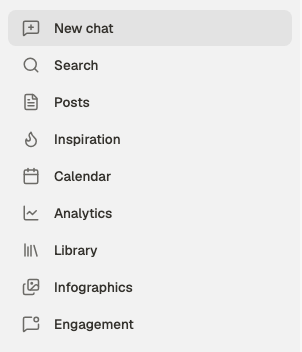 Below those sit your campaigns and your recent chats — groupings for work you've already
started, rather than places to go. See [organizing chats](/chat/organize).
## Chat is the main surface
Almost everything starts in chat — ideas, drafts, analysis, plans, and visuals. You describe
what you want; it draws on your brand, your voice, and what has performed for you.
The other screens are mostly where things **land** after chat has made them, or where you
set up what chat draws on.
Where work gets made.
Where drafts land, get edited, reviewed and published.
## What feeds the output
These decide whether what you get back sounds like you or like anyone. Setting them up is
the difference between the product being useful and being a generic writer.
| Screen | What it feeds |
| ------------------------------------ | ----------------------------------------------- |
| [Brand voice](/chat/brand-voice) | How everything is written |
| [Library](/library/overview) | Your own documents, so drafts use your material |
| [Inspiration](/inspiration/overview) | Examples and viral patterns worth learning from |
| [Strategy](/chat/strategy) | Audience, goal and offer, behind every request |
## Where things go out
| Screen | For |
| ---------------------------------- | --------------------------------------------- |
| [Calendar](/calendar/overview) | Scheduling, and the posting windows behind it |
| [Analytics](/analytics/overview) | What performed, and what to do more of |
| [Engagement](/engagement/overview) | The conversations around publishing |
| [Infographics](/visuals/gallery) | Visuals you've generated |
## What you can ignore for now
**Workspaces, invites, reviewers and multiple brands** exist for teams and client work. If
you're one person publishing for yourself, none of it applies — skip it until someone else
is involved. See [workspaces and brands](/workspace/overview) when that changes.
If you only do one setup task, make it [brand voice](/chat/brand-voice). It applies
to every draft automatically, so it's the one that improves everything at once.
## Related
The same ground as a sequence, in the order worth doing it.
Start here if you want to skip setup and try it.
What to type for anything you want.
When something doesn't behave.
Below those sit your campaigns and your recent chats — groupings for work you've already
started, rather than places to go. See [organizing chats](/chat/organize).
## Chat is the main surface
Almost everything starts in chat — ideas, drafts, analysis, plans, and visuals. You describe
what you want; it draws on your brand, your voice, and what has performed for you.
The other screens are mostly where things **land** after chat has made them, or where you
set up what chat draws on.
Where work gets made.
Where drafts land, get edited, reviewed and published.
## What feeds the output
These decide whether what you get back sounds like you or like anyone. Setting them up is
the difference between the product being useful and being a generic writer.
| Screen | What it feeds |
| ------------------------------------ | ----------------------------------------------- |
| [Brand voice](/chat/brand-voice) | How everything is written |
| [Library](/library/overview) | Your own documents, so drafts use your material |
| [Inspiration](/inspiration/overview) | Examples and viral patterns worth learning from |
| [Strategy](/chat/strategy) | Audience, goal and offer, behind every request |
## Where things go out
| Screen | For |
| ---------------------------------- | --------------------------------------------- |
| [Calendar](/calendar/overview) | Scheduling, and the posting windows behind it |
| [Analytics](/analytics/overview) | What performed, and what to do more of |
| [Engagement](/engagement/overview) | The conversations around publishing |
| [Infographics](/visuals/gallery) | Visuals you've generated |
## What you can ignore for now
**Workspaces, invites, reviewers and multiple brands** exist for teams and client work. If
you're one person publishing for yourself, none of it applies — skip it until someone else
is involved. See [workspaces and brands](/workspace/overview) when that changes.
If you only do one setup task, make it [brand voice](/chat/brand-voice). It applies
to every draft automatically, so it's the one that improves everything at once.
## Related
The same ground as a sequence, in the order worth doing it.
Start here if you want to skip setup and try it.
What to type for anything you want.
When something doesn't behave.