> ## Documentation Index
> Fetch the complete documentation index at: https://docs.depost.ai/llms.txt
> Use this file to discover all available pages before exploring further.
# Writing style
> How your posts sound — learned from what you publish, and yours to change row by row.
[Your strategy](/settings/strategy) decides *what* a post is about and who it's for. This
screen decides *how it sounds*.
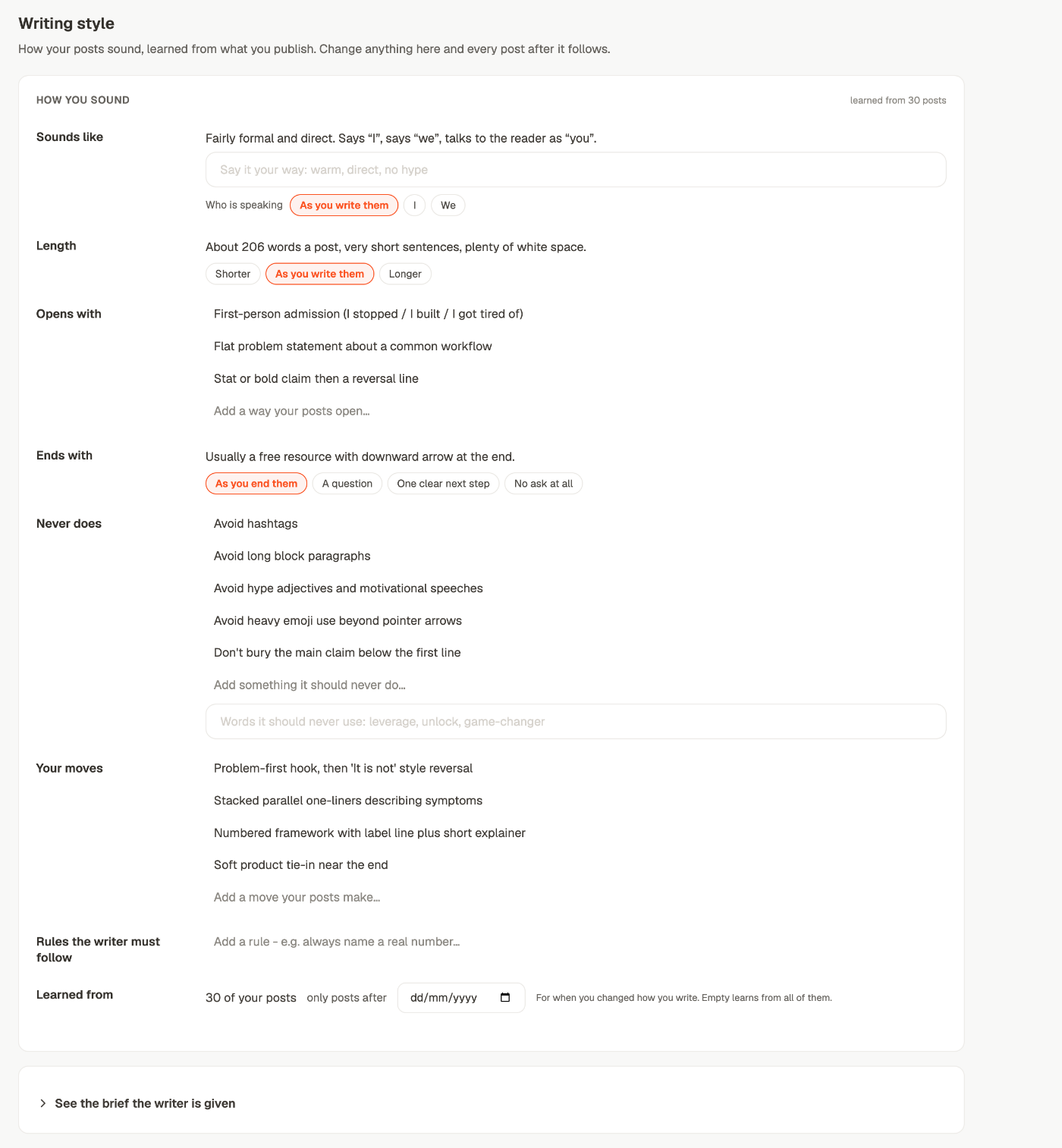
**Settings → Personal brand → Writing style.** Nothing here is a form you fill in: it was
read off your published posts. Change anything and every post written after it follows.
 ## How to read a row
Each row has two parts, and the order is deliberate:
1. **The grey line at the top** — what Depost AI read in your posts. *"About 206 words a
post, very short sentences, plenty of white space."*
2. **Your setting underneath** — what you want instead, if anything.
So you're never changing a setting blind. You can see what you actually do before deciding
whether you want to keep doing it.
The tag in the corner says how much it had to go on: **learned from 30 posts**. With fewer
than three posts it reads **from your profile** instead, and it's a guess until you publish.
## The rows
| Row | What it holds |
| - | - |
| **Sounds like** | The tone it read, plus your own words for how you want to sound — *warm, direct, no hype* |
| **Who is speaking** | `As you write them` · `I` · `We`. An agency whose posts one person writes still reads as "I", so this can't be measured — it's a decision |
| **Length** | `Shorter` · `As you write them` · `Longer` |
| **Opens with** | The ways your posts start. Add, change or remove any line |
| **Ends with** | `As you end them` · `A question` · `One clear next step` · `No ask at all` |
| **Never does** | Your don'ts, plus a separate field for **words it should never use** |
| **Your moves** | The structures you reach for — a numbered framework, a reversal line, stacked one-liners |
| **Rules the writer must follow** | Your own standing rules, one per line. *Always name a real number* |
| **Learned from** | How many posts it read, and **only posts after** a date you can set |
**Only posts after** is for when you changed how you write. If you rebuilt your style in
March, set March and everything before it stops counting. Leave it empty and it learns
from all of them.
### Lines you changed, and getting back
Change a line and the row picks up a **yours** tag. A **Back to what was learned** link
appears with it, so an experiment is never one-way — you can always return the row to what
your posts actually say.
## Rules the writer must follow
This row is worth more attention than its size suggests. Everything else on the screen
describes how you write; this one is an instruction, and the writer is held to it.
Good rules are checkable:
* *Always name a real number rather than "many" or "most"*
* *Never open with a question*
* *Keep paragraphs to two lines*
Vague rules — *be more engaging* — cost you a line and change nothing.
## When a change takes effect
Saving says **Saved. Your next post uses this.** That's exact: the next post, not the one
already in your editor and not anything already scheduled. To apply a change to a draft you
already have, ask chat to rewrite it.
## It keeps learning, and your changes survive
Your voice is re-read from your posts on a weekly cycle, so it follows you rather than
freezing on the month you signed up.
**A refresh never undoes your changes.** What you set by hand is stored separately and
re-applied on top of every refresh. So the learned reading can move as your writing moves,
while *never open with a question* stays true indefinitely.
That's the difference between this screen and the strategy screen worth remembering:
| | What a later read does |
| - | - |
| [**Strategy**](/settings/strategy) | Proposes. Nothing changes until you answer |
| **Writing style** | Re-learns the grey lines. Your settings sit on top, untouched |
Strategy is a decision, so it waits for you. Style is an observation, so it updates — and
your decisions about it are kept apart precisely so it can.
## See the brief the writer is given
At the bottom of the screen, folded away, is the actual brief every draft is written
against: what was learned from your posts, with your changes applied on top.
Open it when output doesn't sound like you and you can't tell why. It's the difference
between guessing at what the writer was told and reading it.
If something you expected is missing from the brief, it was never saved. If it's there and
the draft ignored it, that's a different problem — and worth reporting, because the brief
is the evidence.
## The same card, in two other places
This isn't the only way in. The same rows, saving to the same place:
* **In chat**, as the *"Sound right?"* card after a draft.
* **During setup**, under your first post, with a **Rewrite this post with it** button.
A change made in any of them is the same change — they can't disagree with each other.
## When it still doesn't sound like you
The most direct fix. One line in **Rules the writer must follow** beats five attempts at
rephrasing a prompt.
A vague audience produces vague writing that no voice setting can rescue. See
[your strategy](/settings/strategy).
**Viral Posts** in particular pulls drafts toward other people's structures. See
[give chat the right context](/chat/context).
If the first three didn't do it, the brief tells you what the writer was actually
working from.
## Related
What posts are about, and who they're for.
Standing instructions and reviews, in conversation.
Fixing one post rather than the rule.
Where all of this shows up.
This documentation is built and hosted on [Mintlify](https://mintlify.com), a developer documentation platform.
## How to read a row
Each row has two parts, and the order is deliberate:
1. **The grey line at the top** — what Depost AI read in your posts. *"About 206 words a
post, very short sentences, plenty of white space."*
2. **Your setting underneath** — what you want instead, if anything.
So you're never changing a setting blind. You can see what you actually do before deciding
whether you want to keep doing it.
The tag in the corner says how much it had to go on: **learned from 30 posts**. With fewer
than three posts it reads **from your profile** instead, and it's a guess until you publish.
## The rows
| Row | What it holds |
| - | - |
| **Sounds like** | The tone it read, plus your own words for how you want to sound — *warm, direct, no hype* |
| **Who is speaking** | `As you write them` · `I` · `We`. An agency whose posts one person writes still reads as "I", so this can't be measured — it's a decision |
| **Length** | `Shorter` · `As you write them` · `Longer` |
| **Opens with** | The ways your posts start. Add, change or remove any line |
| **Ends with** | `As you end them` · `A question` · `One clear next step` · `No ask at all` |
| **Never does** | Your don'ts, plus a separate field for **words it should never use** |
| **Your moves** | The structures you reach for — a numbered framework, a reversal line, stacked one-liners |
| **Rules the writer must follow** | Your own standing rules, one per line. *Always name a real number* |
| **Learned from** | How many posts it read, and **only posts after** a date you can set |
**Only posts after** is for when you changed how you write. If you rebuilt your style in
March, set March and everything before it stops counting. Leave it empty and it learns
from all of them.
### Lines you changed, and getting back
Change a line and the row picks up a **yours** tag. A **Back to what was learned** link
appears with it, so an experiment is never one-way — you can always return the row to what
your posts actually say.
## Rules the writer must follow
This row is worth more attention than its size suggests. Everything else on the screen
describes how you write; this one is an instruction, and the writer is held to it.
Good rules are checkable:
* *Always name a real number rather than "many" or "most"*
* *Never open with a question*
* *Keep paragraphs to two lines*
Vague rules — *be more engaging* — cost you a line and change nothing.
## When a change takes effect
Saving says **Saved. Your next post uses this.** That's exact: the next post, not the one
already in your editor and not anything already scheduled. To apply a change to a draft you
already have, ask chat to rewrite it.
## It keeps learning, and your changes survive
Your voice is re-read from your posts on a weekly cycle, so it follows you rather than
freezing on the month you signed up.
**A refresh never undoes your changes.** What you set by hand is stored separately and
re-applied on top of every refresh. So the learned reading can move as your writing moves,
while *never open with a question* stays true indefinitely.
That's the difference between this screen and the strategy screen worth remembering:
| | What a later read does |
| - | - |
| [**Strategy**](/settings/strategy) | Proposes. Nothing changes until you answer |
| **Writing style** | Re-learns the grey lines. Your settings sit on top, untouched |
Strategy is a decision, so it waits for you. Style is an observation, so it updates — and
your decisions about it are kept apart precisely so it can.
## See the brief the writer is given
At the bottom of the screen, folded away, is the actual brief every draft is written
against: what was learned from your posts, with your changes applied on top.
Open it when output doesn't sound like you and you can't tell why. It's the difference
between guessing at what the writer was told and reading it.
If something you expected is missing from the brief, it was never saved. If it's there and
the draft ignored it, that's a different problem — and worth reporting, because the brief
is the evidence.
## The same card, in two other places
This isn't the only way in. The same rows, saving to the same place:
* **In chat**, as the *"Sound right?"* card after a draft.
* **During setup**, under your first post, with a **Rewrite this post with it** button.
A change made in any of them is the same change — they can't disagree with each other.
## When it still doesn't sound like you
The most direct fix. One line in **Rules the writer must follow** beats five attempts at
rephrasing a prompt.
A vague audience produces vague writing that no voice setting can rescue. See
[your strategy](/settings/strategy).
**Viral Posts** in particular pulls drafts toward other people's structures. See
[give chat the right context](/chat/context).
If the first three didn't do it, the brief tells you what the writer was actually
working from.
## Related
What posts are about, and who they're for.
Standing instructions and reviews, in conversation.
Fixing one post rather than the rule.
Where all of this shows up.
This documentation is built and hosted on [Mintlify](https://mintlify.com), a developer documentation platform.