> ## Documentation Index
> Fetch the complete documentation index at: https://docs.depost.ai/llms.txt
> Use this file to discover all available pages before exploring further.
# Edit a post
> Write, format, and prepare a post for review or publishing.
The editor is where a draft becomes something you'd actually publish. Open a post from
[Posts](/posts/overview), or use **Open in editor** on a draft in chat.
 ## Writing
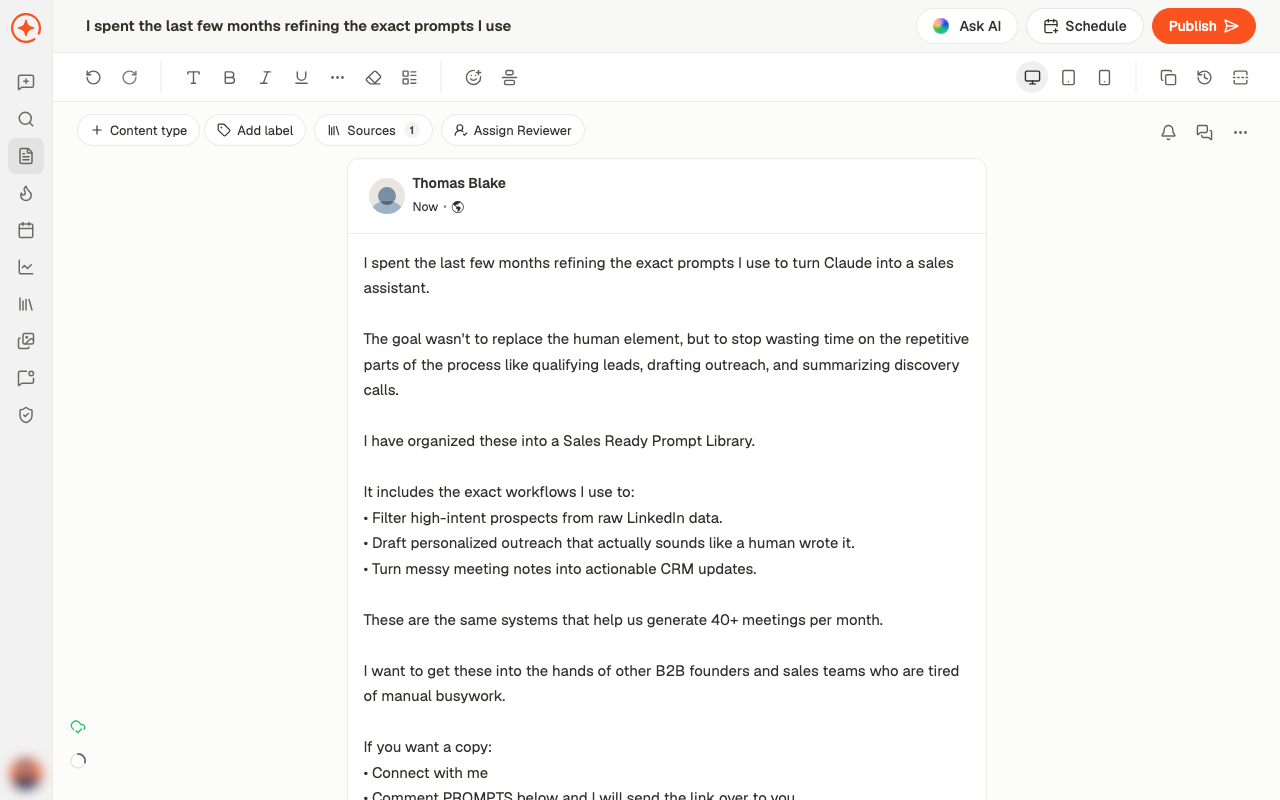
The main area is a live preview — what you see is close to how the post will appear on
LinkedIn, including where the "see more" fold falls.
Formatting sits in the toolbar:
* **Bold** (⌘B), **Italic** (⌘I), **Underline** (⌘U)
* Lists and text styles
* **Clear Formatting** to strip it back
* Emoji
Use **Toggle See More Preview** to check where LinkedIn will cut your post off. Everything
after that fold is only read by people who chose to keep reading, so the lines before it
are doing all the work.
## The controls above the post
| Control | What it does |
| ----------------------- | ------------------------------------------------------------- |
| **Edit post title** | Renames the post internally — this is for you, not the reader |
| **Change content type** | Text, image, video, carousel, poll, and the rest |
| **Add label** | Tag it for filtering on the Posts screen |
| **Sources** | What this post was built from |
| **Assign Reviewer** | Send it to someone before it goes out |
## Getting AI help
**Ask AI** opens a chat attached to this post. That's different from a fresh chat: it
already has the draft, so you can ask for changes directly and one-click actions appear
above the message box.
## Adding media
**Add media to post** covers images, **Video**, **PDF carousel**, and **Poll**. See
[add media](/posts/media) for what each format needs.
## Working with others
* **Post comment** leaves a note on the draft for your team — these stay internal
* **Assign Reviewer** puts it in front of someone for approval
* **Unsubscribe from updates** stops notifications about this particular post
## Other things worth knowing
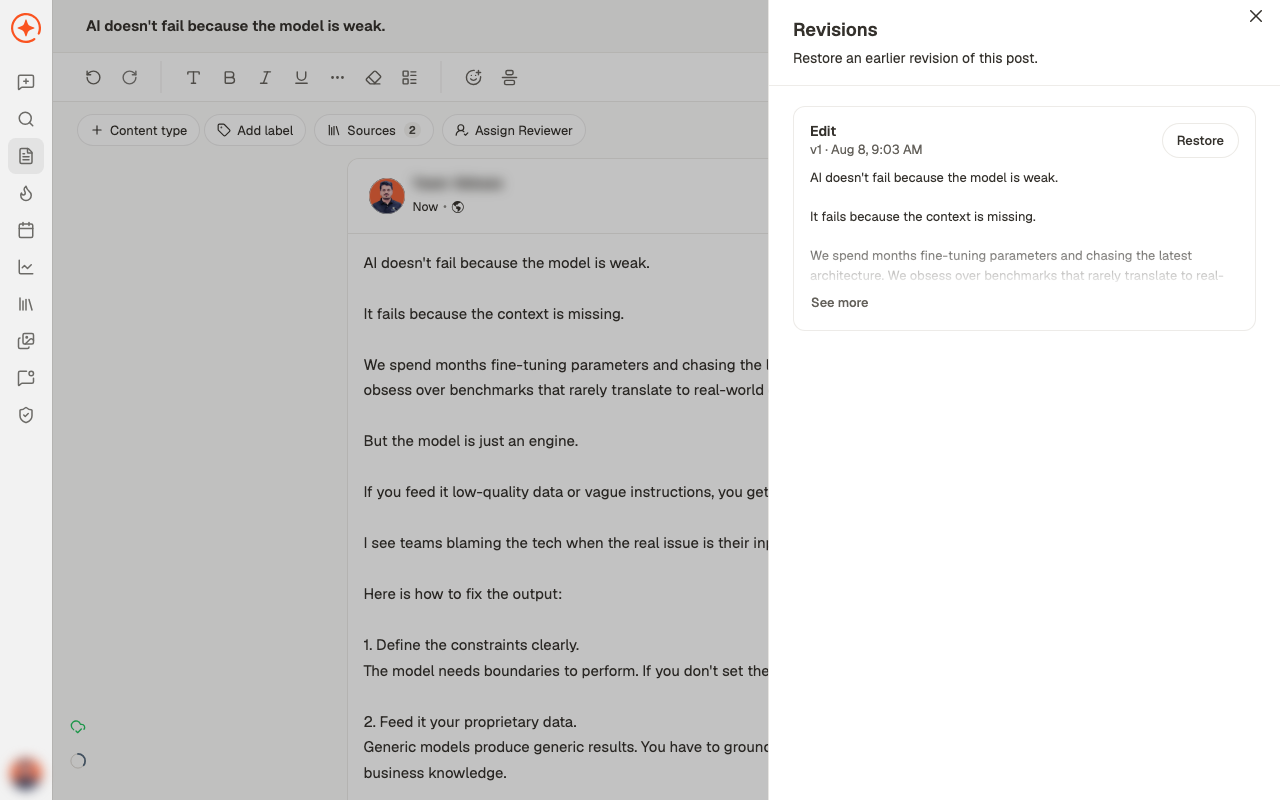
* **Revisions** shows earlier versions, each with a **Restore** — so a rewrite you regret
isn't final
## Writing
The main area is a live preview — what you see is close to how the post will appear on
LinkedIn, including where the "see more" fold falls.
Formatting sits in the toolbar:
* **Bold** (⌘B), **Italic** (⌘I), **Underline** (⌘U)
* Lists and text styles
* **Clear Formatting** to strip it back
* Emoji
Use **Toggle See More Preview** to check where LinkedIn will cut your post off. Everything
after that fold is only read by people who chose to keep reading, so the lines before it
are doing all the work.
## The controls above the post
| Control | What it does |
| ----------------------- | ------------------------------------------------------------- |
| **Edit post title** | Renames the post internally — this is for you, not the reader |
| **Change content type** | Text, image, video, carousel, poll, and the rest |
| **Add label** | Tag it for filtering on the Posts screen |
| **Sources** | What this post was built from |
| **Assign Reviewer** | Send it to someone before it goes out |
## Getting AI help
**Ask AI** opens a chat attached to this post. That's different from a fresh chat: it
already has the draft, so you can ask for changes directly and one-click actions appear
above the message box.
## Adding media
**Add media to post** covers images, **Video**, **PDF carousel**, and **Poll**. See
[add media](/posts/media) for what each format needs.
## Working with others
* **Post comment** leaves a note on the draft for your team — these stay internal
* **Assign Reviewer** puts it in front of someone for approval
* **Unsubscribe from updates** stops notifications about this particular post
## Other things worth knowing
* **Revisions** shows earlier versions, each with a **Restore** — so a rewrite you regret
isn't final
 * **Copy Post** puts the text on your clipboard
* The device toggles preview how it looks on desktop, tablet, and mobile
## When it's ready
**Schedule** puts it on the calendar. **Publish** sends it now. See
[schedule or publish](/posts/schedule-or-publish).
**Next:** add images, a carousel or a poll. See [adding media](/posts/media).
## Related
Finding and filtering your posts.
Images, video, carousels, and polls.
Reviewers, comments, and decisions.
Ask AI, and what it can do with a draft.
* **Copy Post** puts the text on your clipboard
* The device toggles preview how it looks on desktop, tablet, and mobile
## When it's ready
**Schedule** puts it on the calendar. **Publish** sends it now. See
[schedule or publish](/posts/schedule-or-publish).
**Next:** add images, a carousel or a poll. See [adding media](/posts/media).
## Related
Finding and filtering your posts.
Images, video, carousels, and polls.
Reviewers, comments, and decisions.
Ask AI, and what it can do with a draft.