> ## Documentation Index
> Fetch the complete documentation index at: https://docs.depost.ai/llms.txt
> Use this file to discover all available pages before exploring further.
# Inspiration
> A feed of high-performing LinkedIn posts, each with an explanation of why it worked.
Inspiration is where you study what's working on LinkedIn rather than start from a blank
page. It opens on **Viral Posts**, with your saved **Bookmarks** on the second tab.
 ## Reading the feed
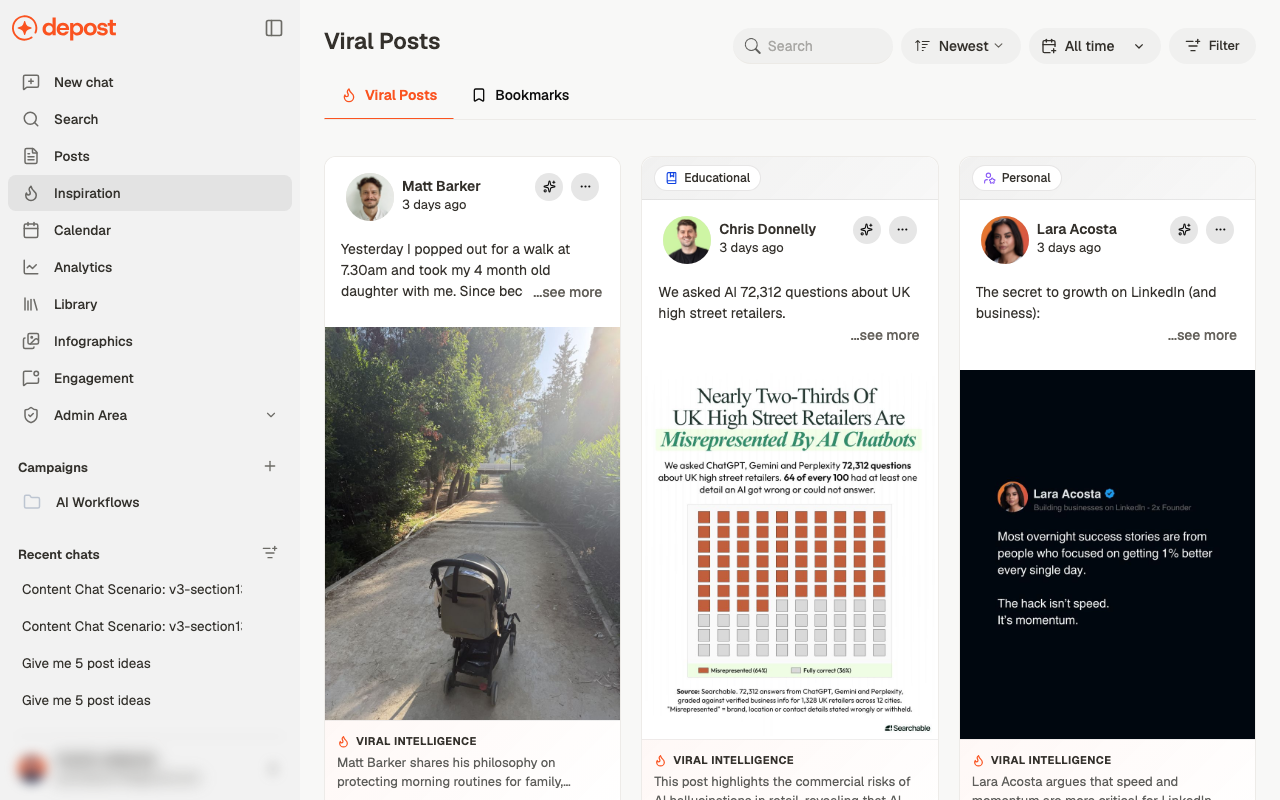
Each card shows the post as it ran — author, age, copy, and any image or carousel. Two
things on top of that are worth knowing about:
* **A category badge** such as *Educational* or *Personal*, so you can tell at a glance what
kind of post it is
* **Viral Intelligence** — a short explanation of *why* the post worked
That second one is the reason to be here. The post itself tells you what someone wrote; the
note tells you what made it land, which is the part you can actually reuse.
## Narrowing it down
* **Search** for a topic or phrase
* **Newest** to change the sort
* **All time** to restrict the period
* **Filter**, which opens a panel
## Reading the feed
Each card shows the post as it ran — author, age, copy, and any image or carousel. Two
things on top of that are worth knowing about:
* **A category badge** such as *Educational* or *Personal*, so you can tell at a glance what
kind of post it is
* **Viral Intelligence** — a short explanation of *why* the post worked
That second one is the reason to be here. The post itself tells you what someone wrote; the
note tells you what made it land, which is the part you can actually reuse.
## Narrowing it down
* **Search** for a topic or phrase
* **Newest** to change the sort
* **All time** to restrict the period
* **Filter**, which opens a panel
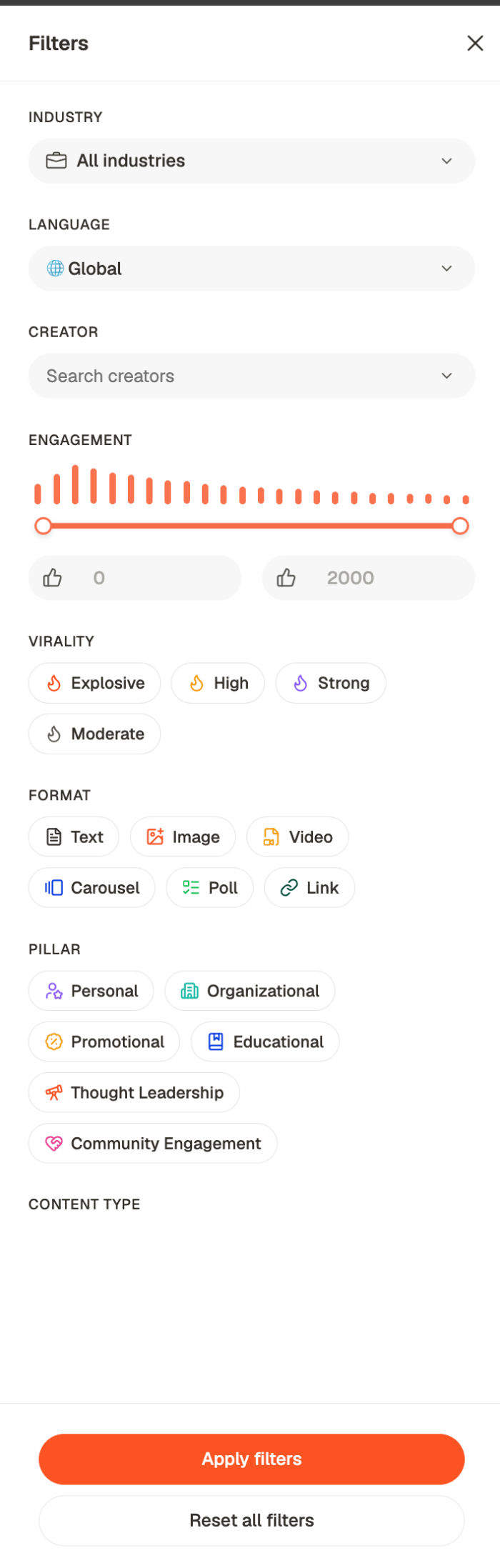 | Filter | Narrows by |
| ----------------------------- | -------------------------------------------------------------------------------------------- |
| **Industry** and **Language** | Whose feed this looks like |
| **Creator** | One person you want to study |
| **Engagement** | A reaction-count range, set with the slider |
| **Virality** | Explosive, High, Strong or Moderate |
| **Format** | Text, Image, Video, Carousel, Poll or Link |
| **Pillar** | Personal, Organizational, Promotional, Educational, Thought Leadership, Community Engagement |
Nothing changes until you press **Apply filters**, and **Reset all filters** puts it back.
Filter before you browse. The feed is large enough that scrolling it untargeted is a way to
lose twenty minutes.
**Format** and **Pillar** together are the useful pair. "Carousel" plus "Educational"
shows you how the format you're considering is actually being used for the job you're
doing, which is a narrower and more useful question than "what's going viral".
## Viral Intelligence
Open a post and you get a full read on it, not just the text.
| Filter | Narrows by |
| ----------------------------- | -------------------------------------------------------------------------------------------- |
| **Industry** and **Language** | Whose feed this looks like |
| **Creator** | One person you want to study |
| **Engagement** | A reaction-count range, set with the slider |
| **Virality** | Explosive, High, Strong or Moderate |
| **Format** | Text, Image, Video, Carousel, Poll or Link |
| **Pillar** | Personal, Organizational, Promotional, Educational, Thought Leadership, Community Engagement |
Nothing changes until you press **Apply filters**, and **Reset all filters** puts it back.
Filter before you browse. The feed is large enough that scrolling it untargeted is a way to
lose twenty minutes.
**Format** and **Pillar** together are the useful pair. "Carousel" plus "Educational"
shows you how the format you're considering is actually being used for the job you're
doing, which is a narrower and more useful question than "what's going viral".
## Viral Intelligence
Open a post and you get a full read on it, not just the text.
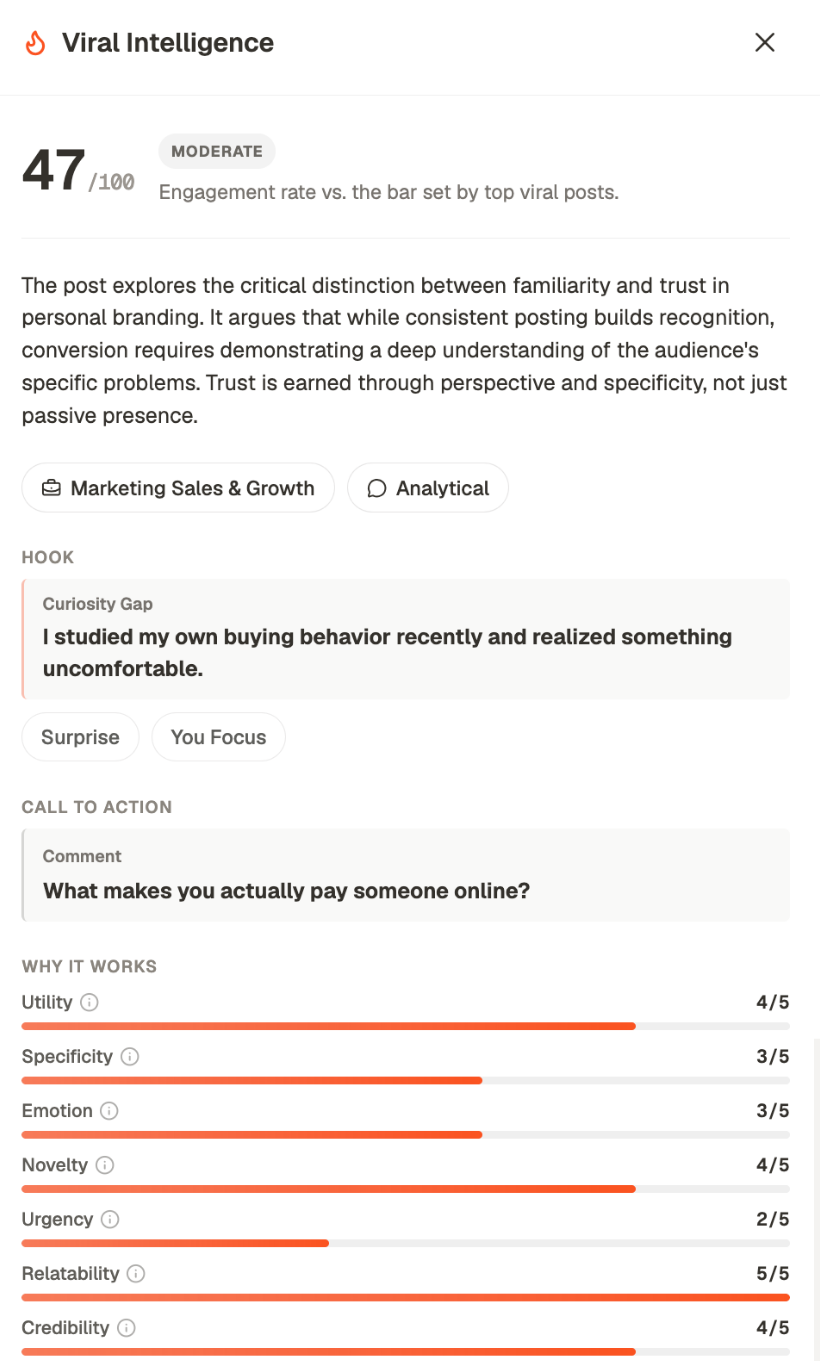 At the top, a **score out of 100** with a band next to it, measured as engagement rate
against the bar set by top viral posts. So it's relative to what's actually working, not to
a fixed target.
Then the parts, pulled out separately:
* **Hook** — the opening line, and what *kind* of hook it is: a Curiosity Gap, a Surprise
* **Call to action** — the ending, and what it asks for
* **Why it works** — seven dimensions scored out of five: utility, specificity, emotion,
novelty, urgency, relatability, credibility
Below those sit **audience fit**, **keywords**, **topics**, and a **structure** breakdown —
word and line count, paragraphs, questions, numbers, bullets, emojis, hashtags, links.
The seven scores are the part to use. A post scoring 5 on relatability and 2 on urgency
tells you what to borrow and what not to. Copying a post wholesale copies its weaknesses
too, and the scores are where those show.
## Acting on a post
Each card has two controls in its top corner: **Repurpose**, which takes the post into chat
so you can ask for your own version, and a more-actions menu for saving and viewing the
original.
Repurpose means *your angle on the same idea*, not a reworded copy. Posting someone
else's structure with your words changed is obvious to anyone who has seen the original.
## Bookmarks
The **Bookmarks** tab holds what you've saved — from the feed here, or from LinkedIn, X,
Reddit and Threads via the browser extension. Tag them as you save and they stay findable.
Bookmarks are also a chat context source, so anything saved here can inform what Depost AI
writes. See [context](/chat/context).
## A workflow that works
Build the collection continuously. Searching for examples when you're already stuck is
the slow way.
Note the pattern — the hook shape, the structure, the kind of proof used.
Bring the pattern, not the post. See [find what's trending](/chat/trends).
## Related
Ask chat to analyze these patterns and benchmark you against them.
Viral Posts and Bookmarks as sources for what you write.
Turn a pattern into something of your own.
Your own material, rather than other people's.
At the top, a **score out of 100** with a band next to it, measured as engagement rate
against the bar set by top viral posts. So it's relative to what's actually working, not to
a fixed target.
Then the parts, pulled out separately:
* **Hook** — the opening line, and what *kind* of hook it is: a Curiosity Gap, a Surprise
* **Call to action** — the ending, and what it asks for
* **Why it works** — seven dimensions scored out of five: utility, specificity, emotion,
novelty, urgency, relatability, credibility
Below those sit **audience fit**, **keywords**, **topics**, and a **structure** breakdown —
word and line count, paragraphs, questions, numbers, bullets, emojis, hashtags, links.
The seven scores are the part to use. A post scoring 5 on relatability and 2 on urgency
tells you what to borrow and what not to. Copying a post wholesale copies its weaknesses
too, and the scores are where those show.
## Acting on a post
Each card has two controls in its top corner: **Repurpose**, which takes the post into chat
so you can ask for your own version, and a more-actions menu for saving and viewing the
original.
Repurpose means *your angle on the same idea*, not a reworded copy. Posting someone
else's structure with your words changed is obvious to anyone who has seen the original.
## Bookmarks
The **Bookmarks** tab holds what you've saved — from the feed here, or from LinkedIn, X,
Reddit and Threads via the browser extension. Tag them as you save and they stay findable.
Bookmarks are also a chat context source, so anything saved here can inform what Depost AI
writes. See [context](/chat/context).
## A workflow that works
Build the collection continuously. Searching for examples when you're already stuck is
the slow way.
Note the pattern — the hook shape, the structure, the kind of proof used.
Bring the pattern, not the post. See [find what's trending](/chat/trends).
## Related
Ask chat to analyze these patterns and benchmark you against them.
Viral Posts and Bookmarks as sources for what you write.
Turn a pattern into something of your own.
Your own material, rather than other people's.