> ## Documentation Index
> Fetch the complete documentation index at: https://docs.depost.ai/llms.txt
> Use this file to discover all available pages before exploring further.
# Engagement
> Track the people you want to build relationships with, organized into lists.
Engagement is the relationship side of Depost AI. Publishing is one half of LinkedIn; the
conversations around it are the other, and this is where those get organized.
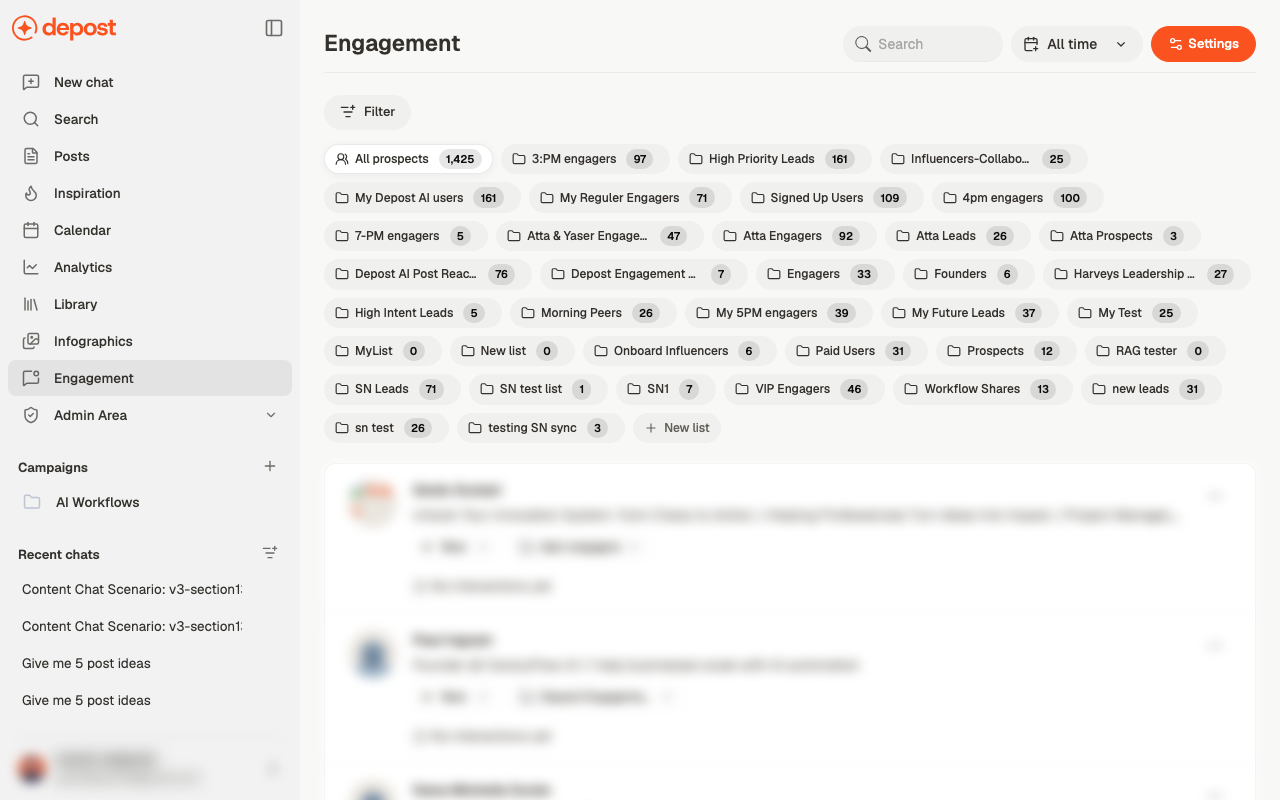 ## Lists
Everyone you track sits in one or more lists, shown as chips across the top with a count on
each. **All prospects** holds everyone; the rest are yours to define.
**New list** creates one. See [lead lists and prospects](/engagement/lead-lists) for filling
them and moving people between them.
## Prospects
Each person shows their name, their LinkedIn headline, a **status**, and which list they're
in. Both status and list are dropdowns on the row, so re-categorising someone doesn't need
a detour into a detail screen.
Where you've interacted before, that history shows on the row. Where you haven't, it says
so — which is the more useful signal, because it tells you where to start.
## Settings
**Settings** controls how comments and messages get written: the tone, the type, and the
instructions every reply is drafted to. See [comments and messages](/engagement/replies).
Replying at a volume no person could manage is the fastest way to sound like a bot, and
the fastest way to get a LinkedIn account restricted. Depost AI drafts the reply. Reading it
and deciding whether to send it stays with you.
## Where prospects come from
Most arrive through the browser extension while you're on LinkedIn, rather than being
entered here. See [the extension](/engagement/extension).
## Related
Creating lists and adding people from LinkedIn.
Tone, comment types, and topic rules.
Adding people and engaging from LinkedIn itself.
Which posts drew the people worth tracking.
## Lists
Everyone you track sits in one or more lists, shown as chips across the top with a count on
each. **All prospects** holds everyone; the rest are yours to define.
**New list** creates one. See [lead lists and prospects](/engagement/lead-lists) for filling
them and moving people between them.
## Prospects
Each person shows their name, their LinkedIn headline, a **status**, and which list they're
in. Both status and list are dropdowns on the row, so re-categorising someone doesn't need
a detour into a detail screen.
Where you've interacted before, that history shows on the row. Where you haven't, it says
so — which is the more useful signal, because it tells you where to start.
## Settings
**Settings** controls how comments and messages get written: the tone, the type, and the
instructions every reply is drafted to. See [comments and messages](/engagement/replies).
Replying at a volume no person could manage is the fastest way to sound like a bot, and
the fastest way to get a LinkedIn account restricted. Depost AI drafts the reply. Reading it
and deciding whether to send it stays with you.
## Where prospects come from
Most arrive through the browser extension while you're on LinkedIn, rather than being
entered here. See [the extension](/engagement/extension).
## Related
Creating lists and adding people from LinkedIn.
Tone, comment types, and topic rules.
Adding people and engaging from LinkedIn itself.
Which posts drew the people worth tracking.