> ## Documentation Index
> Fetch the complete documentation index at: https://docs.depost.ai/llms.txt
> Use this file to discover all available pages before exploring further.
# Find what's trending
> Study the patterns working on LinkedIn right now, and see how your own content compares.
[Analyzing your content](/chat/analyze) looks inward. This looks outward — at the viral
post library, at examples you've saved, and at how your material stacks up against them.
Two distinct things, and it's worth knowing which one you're asking for.
## Study the patterns
Ask about trends when you want to understand what's working, without generating anything
yet.
* *"What's working on LinkedIn in my space right now?"*
* *"What hook structures are showing up in viral posts about AI?"*
* *"What formats are getting engagement for B2B founders?"*
You get an analysis of structures, angles, and patterns. It won't jump to ideas unless you
ask — which is deliberate, because understanding a pattern and applying it are separate
steps and merging them produces imitation.
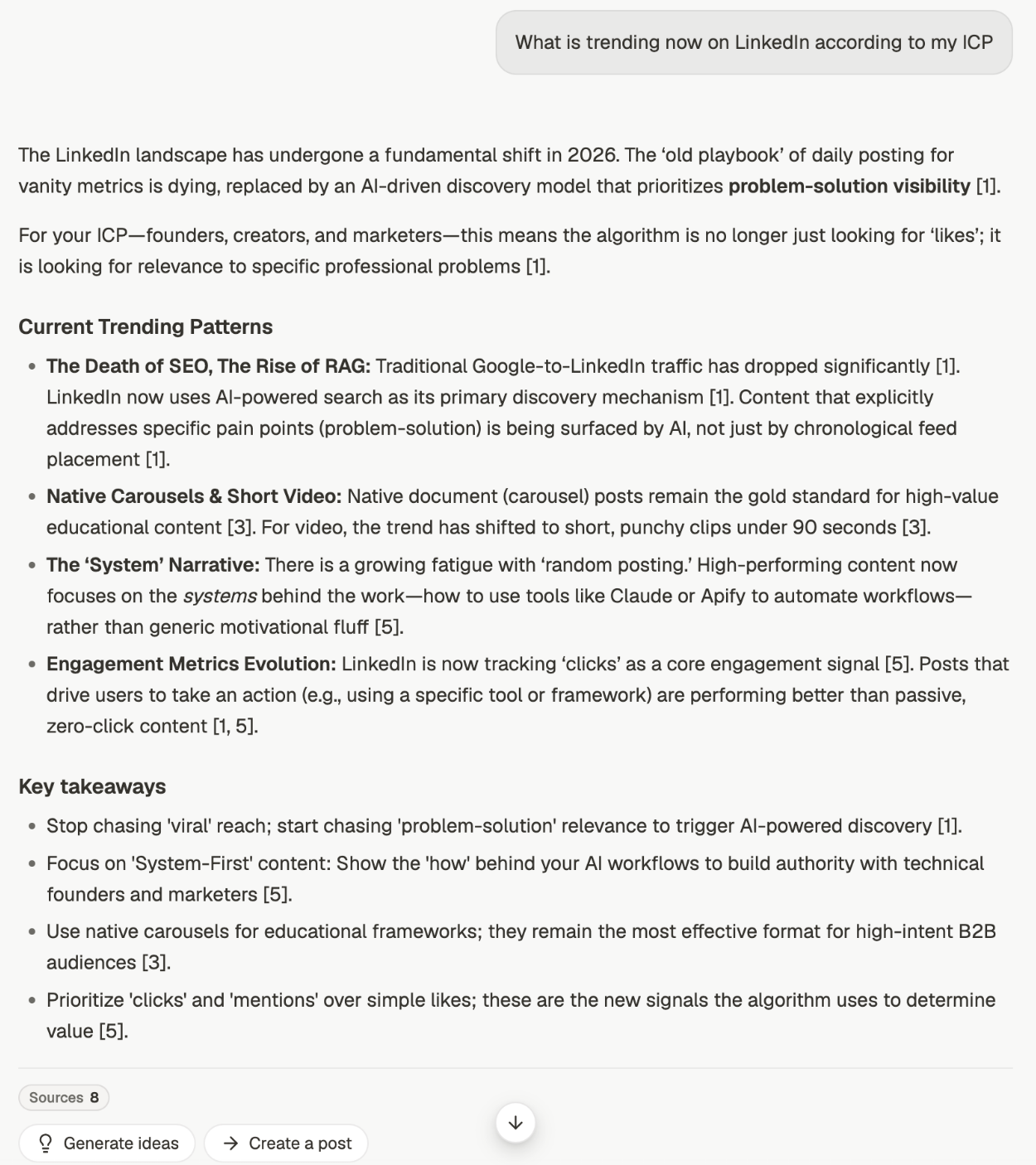 The **Sources** chip underneath carries a count, and opening it shows what the answer was
actually built from, grouped by where each piece came from: viral posts, the web, your own
posts, your bookmarks, your library. See [give chat the right context](/chat/context).
Beside it sit **Generate ideas** and **Create a post**. That's the step from understanding a
pattern to using it, and it stays a separate click on purpose.
## Compare yourself against them
Benchmarking is the more useful of the two. It takes your posts and your performance,
holds them against the patterns, and explains the gap.
* *"How do my posts compare to what's going viral in my space?"*
* *"Benchmark my recent posts against viral trends and tell me what I'm missing"*
* *"What are top creators in my niche doing that I'm not?"*
The output is a direction, not a scorecard: where you're behind, and what to change.
Benchmarking needs your published history and performance data. Without them there's
nothing on your side of the comparison — you'll get trend analysis instead.
## Patterns, not copies
The point is structural. A viral post about someone else's layoffs is not a template you
can fill in — the thing worth borrowing is why it opened the way it did, not what it said.
Get the pattern named — the hook shape, the structure, the kind of proof it used.
Benchmark it against your own posts so the gap is concrete rather than aspirational.
In the same thread, ask for ideas or a draft. It carries the pattern without copying
the post.
If output starts sounding like someone else, turn **Viral Posts** off for the drafting
step. Use it to learn the pattern, not to write the post.
## Related
The inward-facing half — your profile, posts, and performance.
Turn a pattern into something to write.
Save the examples that feed this.
Control whether viral posts are in play.
The **Sources** chip underneath carries a count, and opening it shows what the answer was
actually built from, grouped by where each piece came from: viral posts, the web, your own
posts, your bookmarks, your library. See [give chat the right context](/chat/context).
Beside it sit **Generate ideas** and **Create a post**. That's the step from understanding a
pattern to using it, and it stays a separate click on purpose.
## Compare yourself against them
Benchmarking is the more useful of the two. It takes your posts and your performance,
holds them against the patterns, and explains the gap.
* *"How do my posts compare to what's going viral in my space?"*
* *"Benchmark my recent posts against viral trends and tell me what I'm missing"*
* *"What are top creators in my niche doing that I'm not?"*
The output is a direction, not a scorecard: where you're behind, and what to change.
Benchmarking needs your published history and performance data. Without them there's
nothing on your side of the comparison — you'll get trend analysis instead.
## Patterns, not copies
The point is structural. A viral post about someone else's layoffs is not a template you
can fill in — the thing worth borrowing is why it opened the way it did, not what it said.
Get the pattern named — the hook shape, the structure, the kind of proof it used.
Benchmark it against your own posts so the gap is concrete rather than aspirational.
In the same thread, ask for ideas or a draft. It carries the pattern without copying
the post.
If output starts sounding like someone else, turn **Viral Posts** off for the drafting
step. Use it to learn the pattern, not to write the post.
## Related
The inward-facing half — your profile, posts, and performance.
Turn a pattern into something to write.
Save the examples that feed this.
Control whether viral posts are in play.