> ## Documentation Index
> Fetch the complete documentation index at: https://docs.depost.ai/llms.txt
> Use this file to discover all available pages before exploring further.
# Hooks, CTAs and pinned comments
> The three parts of a post that decide whether it gets read, gets a response, and keeps working after it's live.
A post can be right and still fail on three specific things: nobody reads past the first
line, nobody does anything at the end, and nothing happens in the comments.
Each of those is its own request in chat, and each returns **a set of options rather than
one answer**, so you're choosing rather than accepting.
## You don't need a draft first
This is the part most people miss. All three work from whatever you have:
| You have | Ask |
| -------------------- | -------------------------------------------------------------- |
| A finished draft | *"Generate hooks for this post"* |
| An idea from a list | *"Write hooks for idea 3"* |
| Only a topic | *"Give me hook options for a post about pricing transparency"* |
| A published post | *"Write pinned comments for my last post"* |
| Some text you pasted | *"Give me CTA options for this"* |
So you can test whether an angle has a strong opening **before** you commit to writing the
post. That's usually a better order: if none of the hooks land, the angle is the problem,
and you've spent one request finding out instead of a draft.
## Hooks
The opening line. Ask for options and pick one.
* *"Generate hooks for this post"*
* *"Give me ten hook options for a post about why founders should document their expertise"*
* *"Rewrite the opening — it's too slow"*
Hooks are the one place Depost AI looks **outward as well as inward**. Alongside your voice and
your own posts, it draws on **viral posts** and on **what has performed for you**, because
openings are the most transferable part of a post. A structure that worked in your niche
usually still works in your hands.
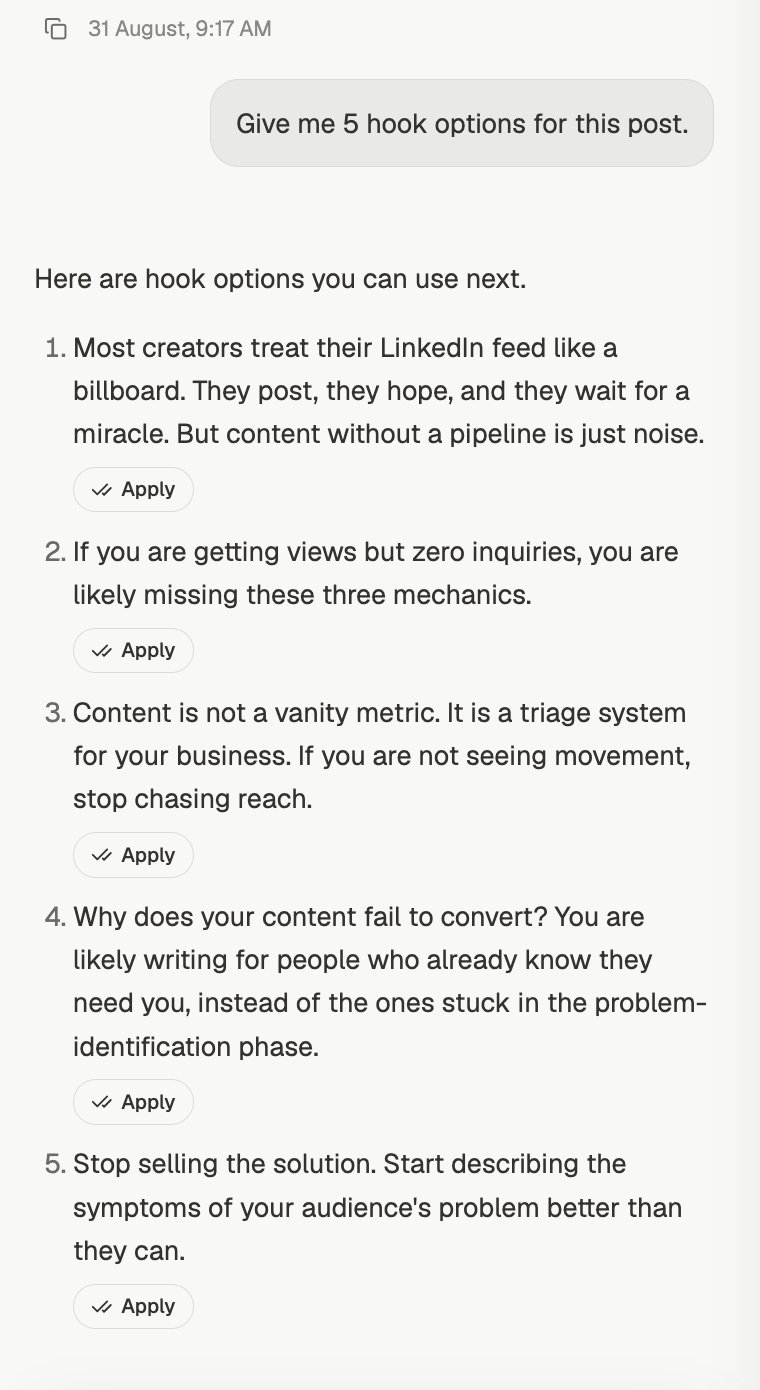 Each option has its own **Apply** button. That's the part worth knowing: you don't copy the
hook you like and paste it in, you press Apply and it replaces the opening of the draft.
Ask for more than you think you need. Ten hooks and one good one beats three hooks and a
compromise, and the cost is the same request.
## CTAs
The ending, and what you want the reader to actually do.
* *"Generate CTA options"*
* *"Give me a softer ending — this one is too salesy"*
* *"What should the CTA be if I want replies rather than clicks?"*
CTAs work differently from hooks. They're built from **your strategy** — the goal, the
audience and the offer you confirmed at setup — plus **your own performance**. They don't
draw on viral posts, which is deliberate: a call to action that worked for someone with a
different offer is not evidence about yours.
Each option has its own **Apply** button. That's the part worth knowing: you don't copy the
hook you like and paste it in, you press Apply and it replaces the opening of the draft.
Ask for more than you think you need. Ten hooks and one good one beats three hooks and a
compromise, and the cost is the same request.
## CTAs
The ending, and what you want the reader to actually do.
* *"Generate CTA options"*
* *"Give me a softer ending — this one is too salesy"*
* *"What should the CTA be if I want replies rather than clicks?"*
CTAs work differently from hooks. They're built from **your strategy** — the goal, the
audience and the offer you confirmed at setup — plus **your own performance**. They don't
draw on viral posts, which is deliberate: a call to action that worked for someone with a
different offer is not evidence about yours.
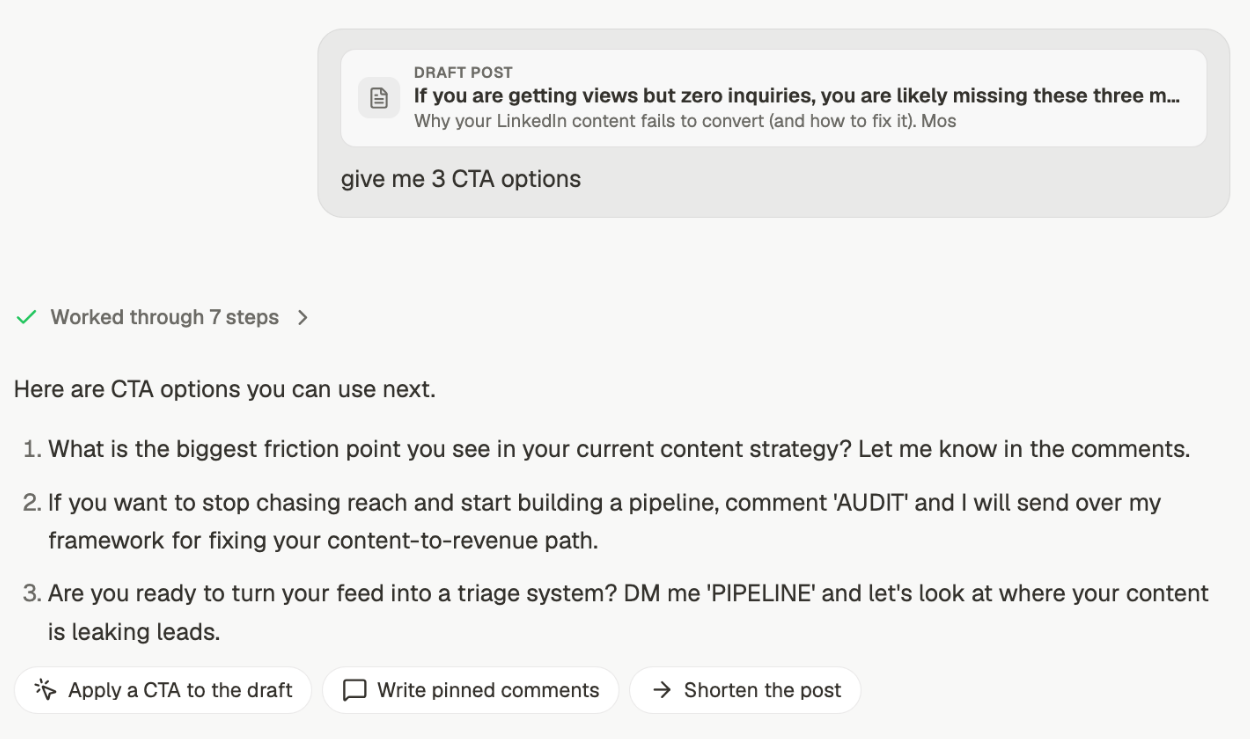 The draft rides along as context, shown as a **DRAFT POST** chip above your message, so
"give me 3 CTA options" is enough. **Apply a CTA to the draft** puts your pick in.
This makes CTA quality depend directly on your strategy being right. If the goal or the
offer is wrong there, every CTA will be confidently aimed at the wrong thing. Check it
with *"show me my current strategy"*. See [your content strategy](/chat/strategy).
## Pinned comments
The comment you leave under your own post once it's live. It extends the post rather than
repeating it — the detail that didn't fit, the link, the offer, the question that restarts
the conversation.
* *"Write pinned comments for this post"*
* *"Write a pinned comment that points at the full guide"*
The draft rides along as context, shown as a **DRAFT POST** chip above your message, so
"give me 3 CTA options" is enough. **Apply a CTA to the draft** puts your pick in.
This makes CTA quality depend directly on your strategy being right. If the goal or the
offer is wrong there, every CTA will be confidently aimed at the wrong thing. Check it
with *"show me my current strategy"*. See [your content strategy](/chat/strategy).
## Pinned comments
The comment you leave under your own post once it's live. It extends the post rather than
repeating it — the detail that didn't fit, the link, the offer, the question that restarts
the conversation.
* *"Write pinned comments for this post"*
* *"Write a pinned comment that points at the full guide"*
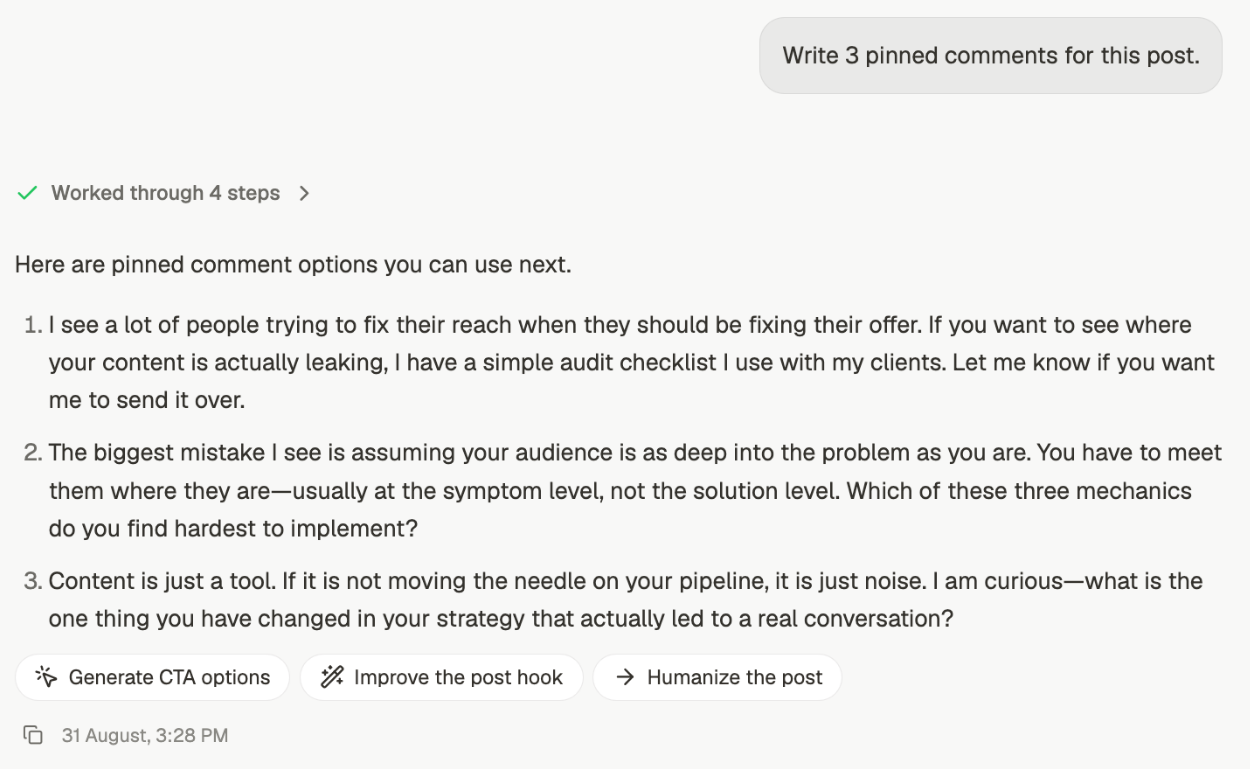 This is the one people skip, and it's free reach. A post stops moving when the comments
stop. A pinned comment worth replying to is the cheapest way to restart it.
## Applying what you picked
Options are only useful if getting one into the draft is easy, and it is. There are two
routes and you'll meet both:
* **Apply**, on an individual option. Used for hooks, where each one is a self-contained
replacement for the opening line.
* **Apply a CTA to the draft**, in the follow-up row. Used where the change is to the post
as a whole rather than one line of it.
Either way the draft updates in place. Nothing is copied, pasted, or retyped, so the version
you keep working on stays the one Depost AI has context on.
## Improving rather than generating
If you already have a hook or a CTA and it's nearly right, say so instead of asking for a
fresh set:
* *"Improve this hook, keep the specifics"*
* *"Same CTA, less pushy"*
You get a revision of what you wrote, not five alternatives to choose between.
## From a draft in the thread
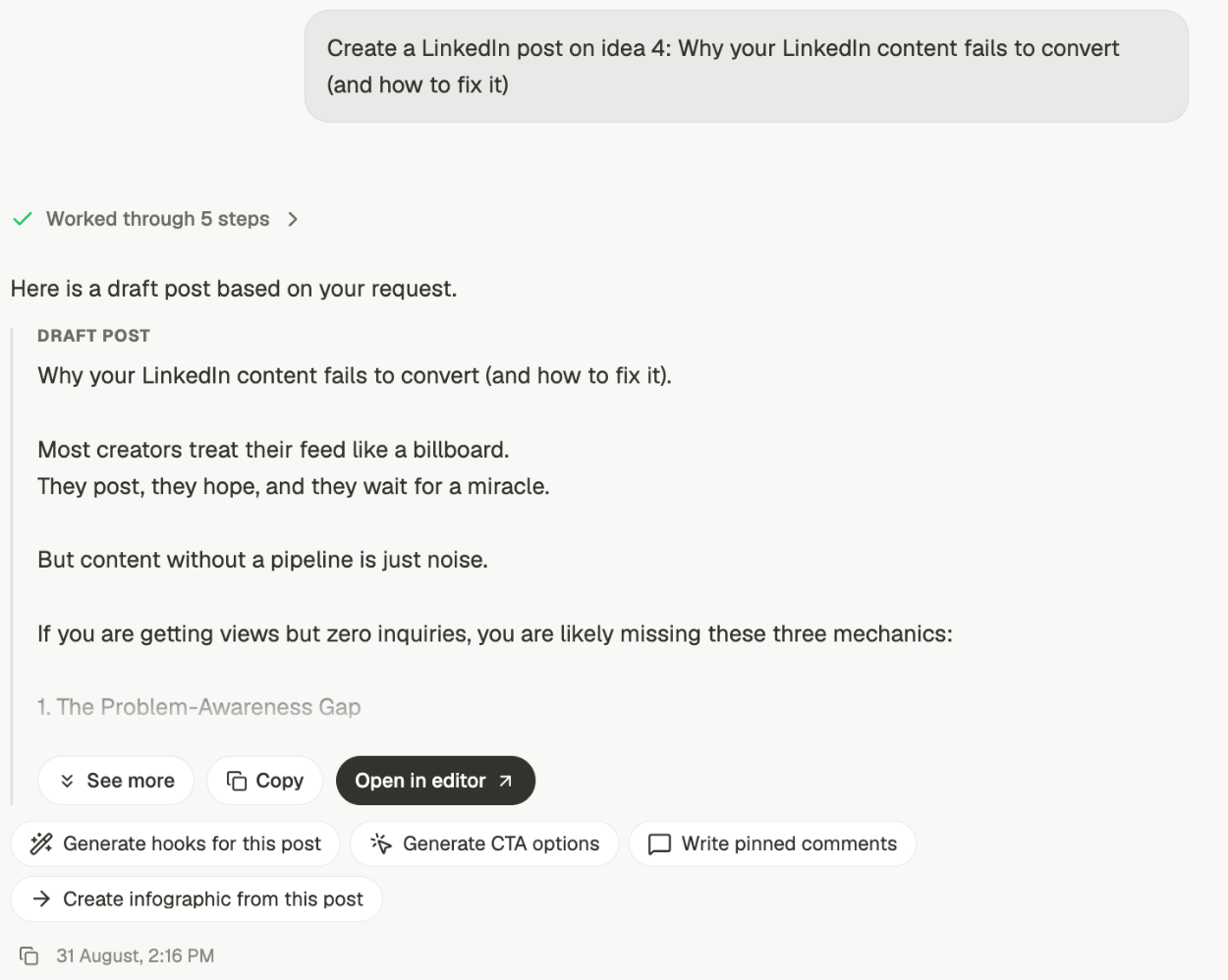
When Depost AI has just written you a post, three of these are one click underneath it:
**Generate hooks for this post**, **Generate CTA options**, and **Write pinned comments**.
Use those rather than starting a new chat. They already have the draft, so nothing gets
re-explained and nothing drifts.
This is the one people skip, and it's free reach. A post stops moving when the comments
stop. A pinned comment worth replying to is the cheapest way to restart it.
## Applying what you picked
Options are only useful if getting one into the draft is easy, and it is. There are two
routes and you'll meet both:
* **Apply**, on an individual option. Used for hooks, where each one is a self-contained
replacement for the opening line.
* **Apply a CTA to the draft**, in the follow-up row. Used where the change is to the post
as a whole rather than one line of it.
Either way the draft updates in place. Nothing is copied, pasted, or retyped, so the version
you keep working on stays the one Depost AI has context on.
## Improving rather than generating
If you already have a hook or a CTA and it's nearly right, say so instead of asking for a
fresh set:
* *"Improve this hook, keep the specifics"*
* *"Same CTA, less pushy"*
You get a revision of what you wrote, not five alternatives to choose between.
## From a draft in the thread
When Depost AI has just written you a post, three of these are one click underneath it:
**Generate hooks for this post**, **Generate CTA options**, and **Write pinned comments**.
Use those rather than starting a new chat. They already have the draft, so nothing gets
re-explained and nothing drifts.
 **Next:** open the draft in the editor to format it. See [editing a post](/posts/edit).
## Related
Where these usually start.
What CTAs are aimed at.
Changing a draft you already have.
Where the finished post goes.
**Next:** open the draft in the editor to format it. See [editing a post](/posts/edit).
## Related
Where these usually start.
What CTAs are aimed at.
Changing a draft you already have.
Where the finished post goes.