> ## Documentation Index
> Fetch the complete documentation index at: https://docs.depost.ai/llms.txt
> Use this file to discover all available pages before exploring further.
# Create a post
> Go from a topic to a draft, then straight into hooks, CTAs, pinned comments, or the editor.
Ask for a post and you get a draft in the thread, along with everything you'd normally do
next.
## Start from an idea
The route that works best is two steps, not one. Ask for ideas, pick one, turn it into a
post.
*"Give me 5 best post ideas"*. Each comes back with the reasoning behind it, a freshness
score and a suggested format. See [get ideas and angles](/chat/ideas).
Press **Create draft** on the idea, or name it: *"Create a LinkedIn post on idea 4"*.
The thread already holds the idea, so there's nothing to retype.
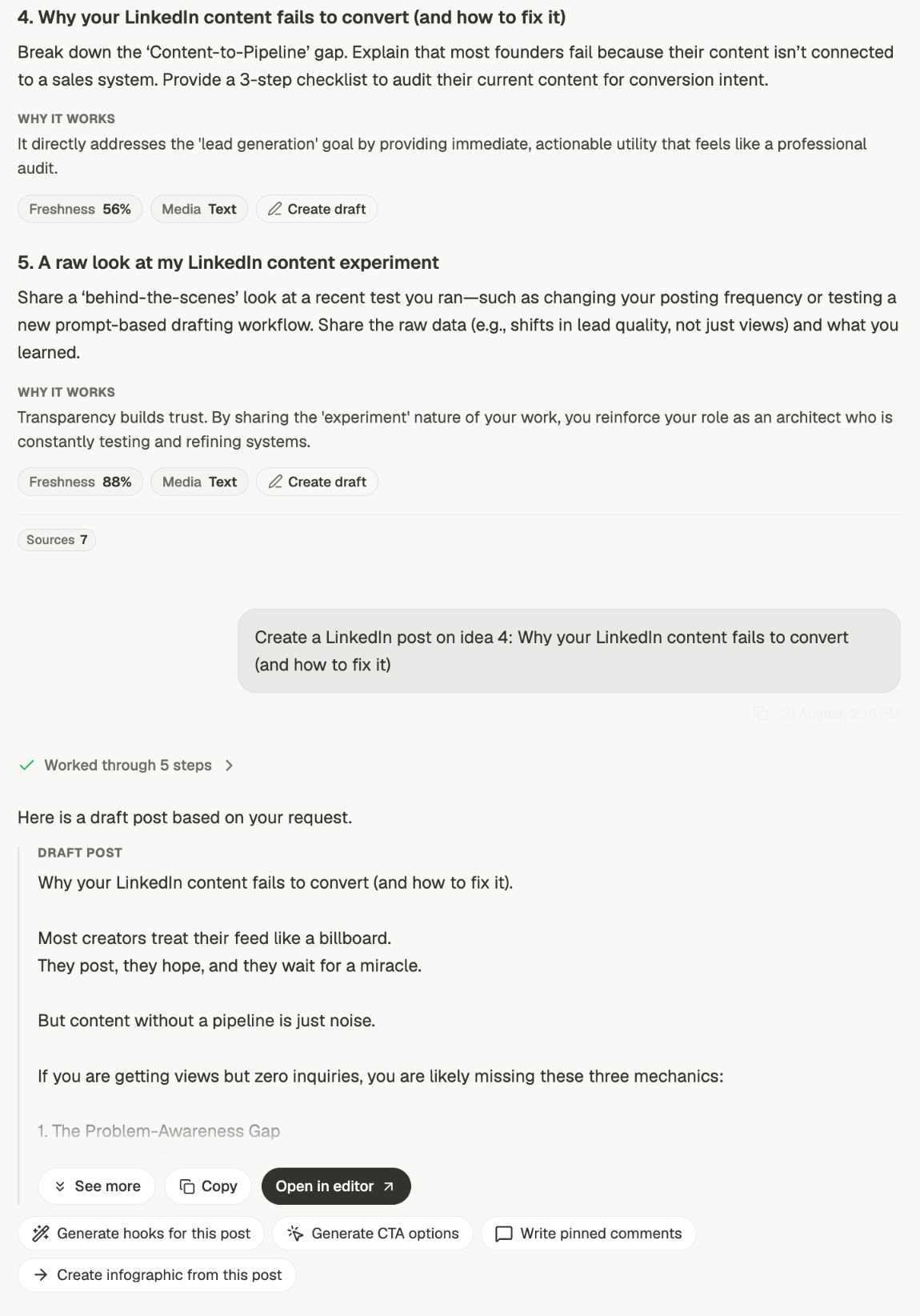 The reason this beats asking for a post cold is that the idea step is where you choose. Five
options with their reasoning attached are easier to judge than one draft you either take or
reject, and the one you pick carries its angle and its format through into the writing.
## Or bring your own topic
You don't have to start from ideas. Give it a subject and it writes:
* ✅ *"Write a LinkedIn post about why founders should document their expertise before
hiring a marketer"*
* ⚠️ *"Write a post in my voice"*
The second has no subject, so Depost AI has nothing to write about and will offer ideas to pick
from instead. That's a reasonable fallback, but it surprises people — if you wanted a
draft, name the subject.
You can also start from something you've already got: paste a draft and ask for it to be
reworked, or attach a document and ask for a post out of it. See
[improve a draft](/chat/improve) and [attachments](/chat/attachments).
Your brand voice is applied to every draft automatically, so "in my voice" adds nothing.
Spend those words on the topic, the audience, or the ending instead.
## What comes back
The reason this beats asking for a post cold is that the idea step is where you choose. Five
options with their reasoning attached are easier to judge than one draft you either take or
reject, and the one you pick carries its angle and its format through into the writing.
## Or bring your own topic
You don't have to start from ideas. Give it a subject and it writes:
* ✅ *"Write a LinkedIn post about why founders should document their expertise before
hiring a marketer"*
* ⚠️ *"Write a post in my voice"*
The second has no subject, so Depost AI has nothing to write about and will offer ideas to pick
from instead. That's a reasonable fallback, but it surprises people — if you wanted a
draft, name the subject.
You can also start from something you've already got: paste a draft and ask for it to be
reworked, or attach a document and ask for a post out of it. See
[improve a draft](/chat/improve) and [attachments](/chat/attachments).
Your brand voice is applied to every draft automatically, so "in my voice" adds nothing.
Spend those words on the topic, the audience, or the ending instead.
## What comes back
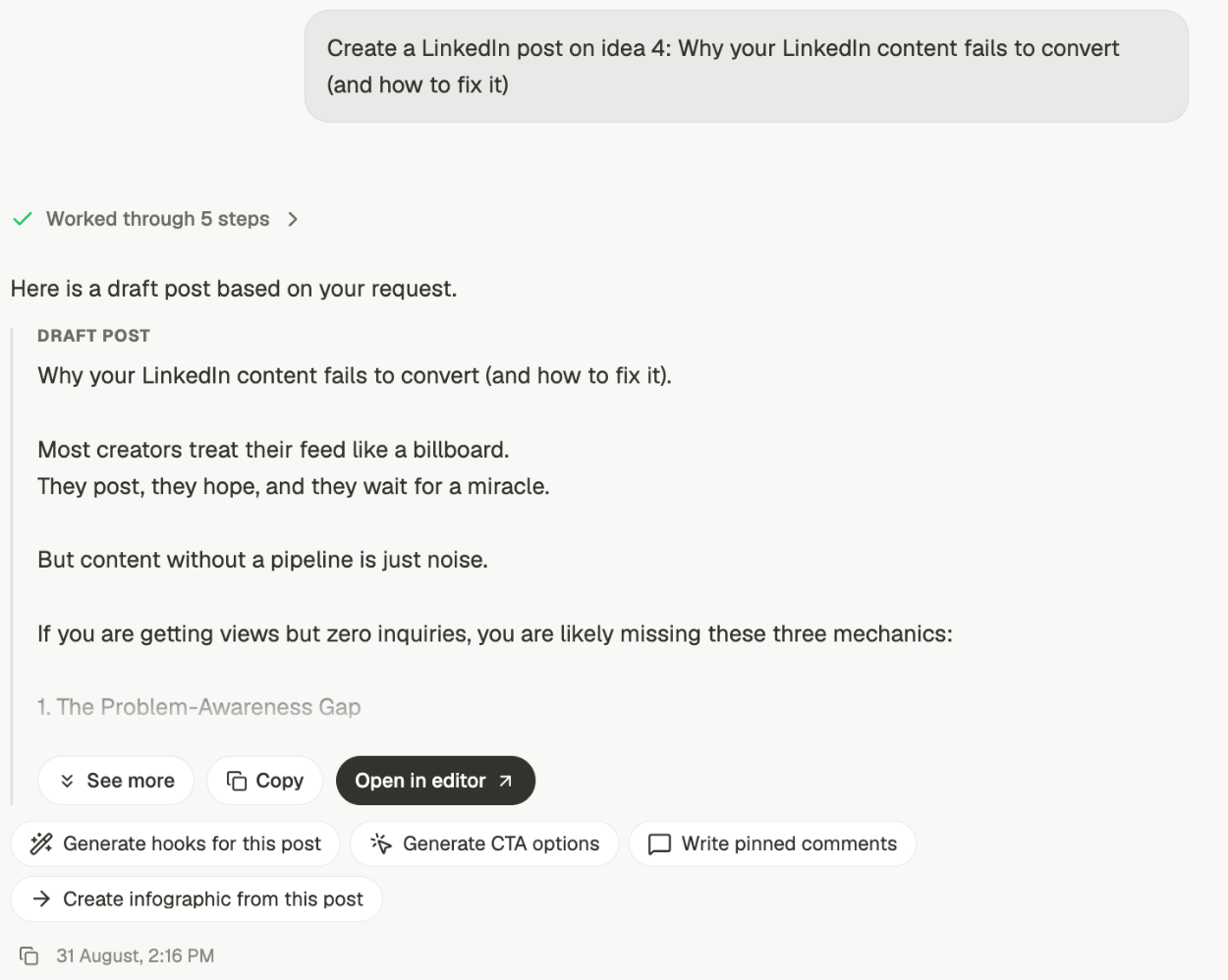 The draft arrives as a **DRAFT POST** block. Under it:
* **See more** — expand the draft in place
* **Copy** — the text on your clipboard
* **Open in editor** — move it into the editor to format, add media, and schedule
Then a row of follow-ups that use the draft you just got:
Alternative openings, so you can test a stronger first line.
Different endings, matched to what you want the reader to do.
A comment to pin under the post once it's live.
Turn the same material into a visual.
Use these instead of starting a new chat. They already have the draft as context, so you
don't re-explain anything.
## Getting a better draft first time
"About hiring" and "about hiring, for technical founders making their first marketing
hire" produce very different posts.
A post that ends on a question reads differently from one that ends on an offer. If you
don't say, you'll get whatever fits.
A specific number, a thing that actually happened, a mistake you made. Specifics are
what stop a draft sounding like everyone else's.
If the draft is close, say what's wrong with it in the same thread. Starting again
throws away the context that got you most of the way.
**Next:** sharpen the opening and the ending. See
[hooks, CTAs and pinned comments](/chat/hooks-and-ctas).
## Related
Start here when you don't have a topic yet.
Control what the draft is built from.
Find out what's worked before you write the next one.
Where a draft goes to be finished and scheduled.
The draft arrives as a **DRAFT POST** block. Under it:
* **See more** — expand the draft in place
* **Copy** — the text on your clipboard
* **Open in editor** — move it into the editor to format, add media, and schedule
Then a row of follow-ups that use the draft you just got:
Alternative openings, so you can test a stronger first line.
Different endings, matched to what you want the reader to do.
A comment to pin under the post once it's live.
Turn the same material into a visual.
Use these instead of starting a new chat. They already have the draft as context, so you
don't re-explain anything.
## Getting a better draft first time
"About hiring" and "about hiring, for technical founders making their first marketing
hire" produce very different posts.
A post that ends on a question reads differently from one that ends on an offer. If you
don't say, you'll get whatever fits.
A specific number, a thing that actually happened, a mistake you made. Specifics are
what stop a draft sounding like everyone else's.
If the draft is close, say what's wrong with it in the same thread. Starting again
throws away the context that got you most of the way.
**Next:** sharpen the opening and the ending. See
[hooks, CTAs and pinned comments](/chat/hooks-and-ctas).
## Related
Start here when you don't have a topic yet.
Control what the draft is built from.
Find out what's worked before you write the next one.
Where a draft goes to be finished and scheduled.