> ## Documentation Index
> Fetch the complete documentation index at: https://docs.depost.ai/llms.txt
> Use this file to discover all available pages before exploring further.
# Analyze your content
> Get a read on your profile, your posts, and your performance before you write anything new.
Chat can read your own material — what you've published, what performed, how you write —
and tell you something specific about it.
Start here when you're not sure what to write next. Asking what's working usually produces
better ideas than asking for ideas directly.
Ask in your own words. You don't need a command:
 ## What comes back
An analysis opens with the answer, not the workings. You get a read on your positioning,
then what worked and what didn't, each quoting the post it's talking about.
## What comes back
An analysis opens with the answer, not the workings. You get a read on your positioning,
then what worked and what didn't, each quoting the post it's talking about.
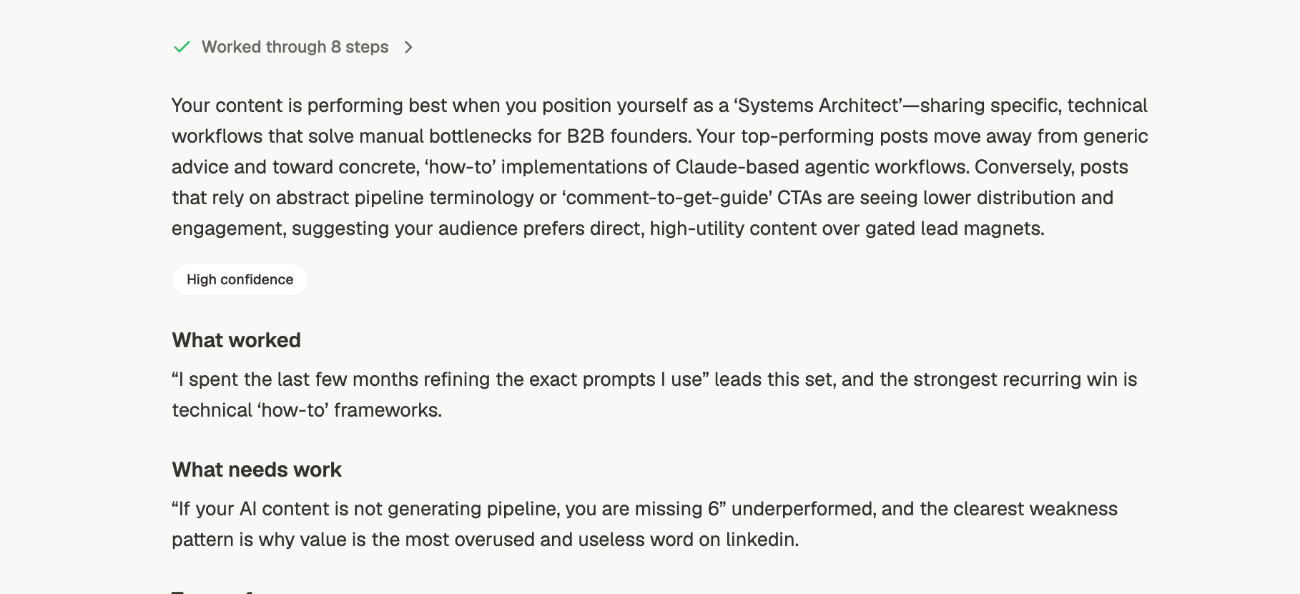 Two things on that screen are worth knowing about.
**Worked through 8 steps** expands. If you want to see what it read and how it got there,
it's in that panel rather than in the answer.
**High confidence** is a claim about the evidence, not the advice. When there isn't enough
published history to be sure, it says so instead of sounding equally certain.
Then it names the posts behind the verdict, with the numbers:
Two things on that screen are worth knowing about.
**Worked through 8 steps** expands. If you want to see what it read and how it got there,
it's in that panel rather than in the answer.
**High confidence** is a claim about the evidence, not the advice. When there isn't enough
published history to be sure, it says so instead of sounding equally certain.
Then it names the posts behind the verdict, with the numbers:
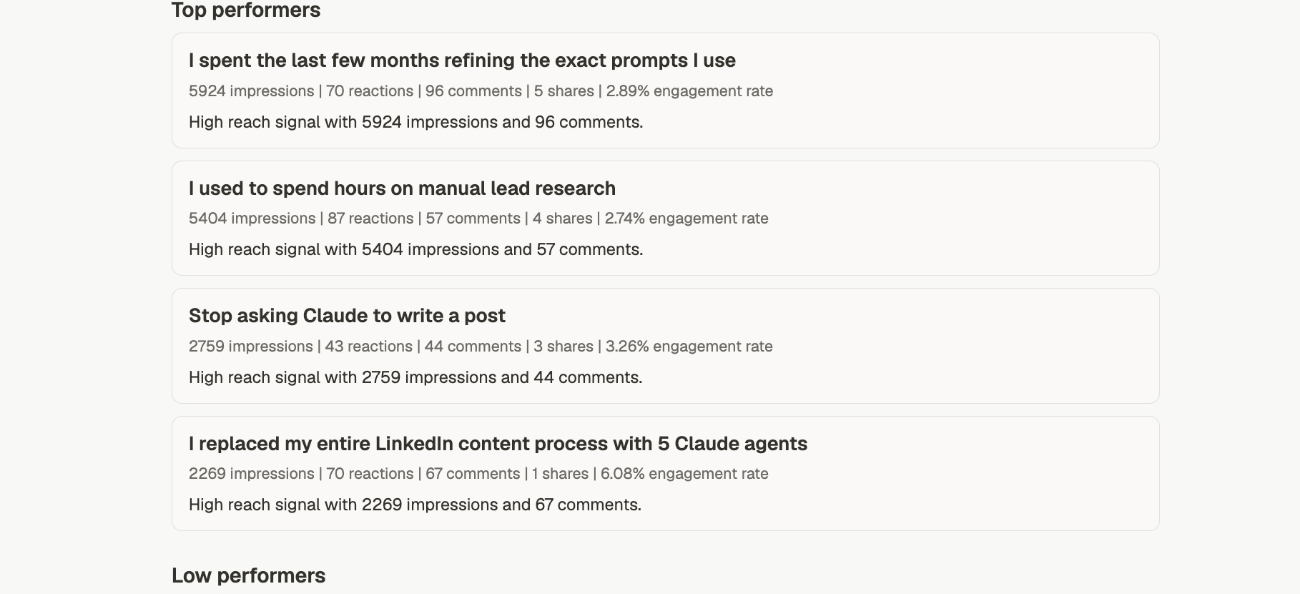 **Low performers** follows the same shape. That half is the useful one, and it's the half
most people skim.
Underneath, **Insights** is where it stops listing posts and starts naming patterns:
**Low performers** follows the same shape. That half is the useful one, and it's the half
most people skim.
Underneath, **Insights** is where it stops listing posts and starts naming patterns:
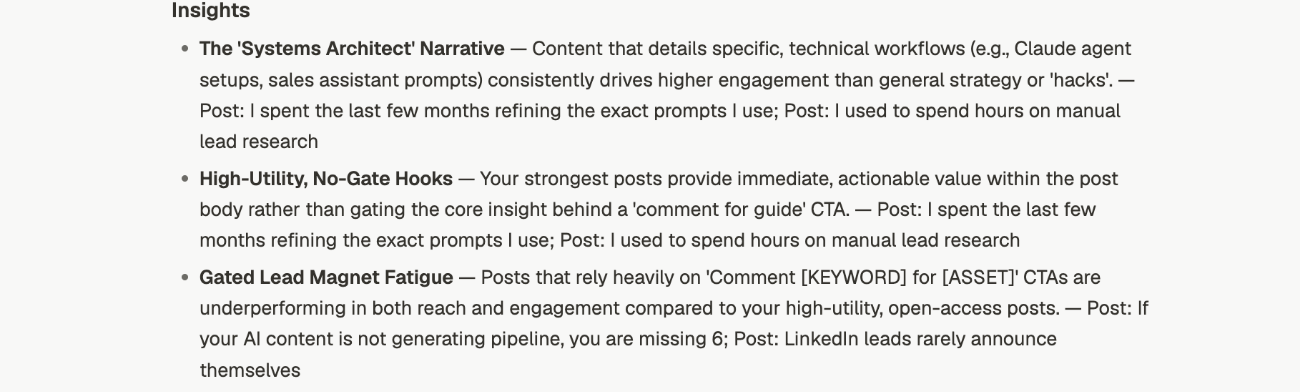 Each one is a named pattern, an explanation, and the posts it came from. The names are the
useful part. **Gated Lead Magnet Fatigue** is something you can act on and watch for.
"posts underperformed" is not.
Insights are also where an analysis earns its keep on a second reading. The performer lists
tell you what happened. This tells you why, and the reasoning is attached, so you can
disagree with it.
## What you can ask for
| Ask about | You get | Try |
| ------------------ | ----------------------------------------------------------------- | ---------------------------------------------------- |
| **Your profile** | Positioning, clarity, credibility, and what's blocking conversion | *"Audit my LinkedIn profile"* |
| **Recent posts** | Themes, strengths, weaknesses, and patterns worth acting on | *"Analyze my recent posts"* |
| **Best posts** | The repeatable structure behind what worked | *"What do my best-performing posts have in common?"* |
| **Content gaps** | Topics and angles you're under-covering | *"What am I not posting about that I should be?"* |
| **Voice patterns** | Your tone habits, hooks, and formatting tics | *"What are the patterns in how I write?"* |
| **Performance** | What worked, what didn't, what to double down on | *"What should I do more of based on my numbers?"* |
| **Anything else** | A direct answer from your own material | *"Which of my posts mention pricing?"* |
That last row matters more than it looks. You aren't limited to fixed reports — you can
ask an open question about your own content and get an answer rather than a template.
## Some of these need history
Analysis works from your material, so a new workspace has less to work with:
* **Profile, voice patterns, content gaps** work as soon as your brand is set up
* **Recent posts, best posts, performance** need published history and synced analytics
If an analysis comes back thin, the usual cause is not enough published history rather
than a bad question. Check what's in [Analytics](/analytics/overview) first.
## Getting a sharper answer
"Analyze my recent posts" is vaguer than "analyze my posts from the last 90 days".
Naming a window changes what gets looked at.
"Analyze my posts" gets a general read. "Analyze my posts — I want to know why my
reach dropped in June" gets an answer to your actual question.
Analysis of your own content usually doesn't need **Viral Posts** or **Web Search**.
Turning them off keeps the answer about you. See [context](/chat/context).
Run analyze → ideas → draft in one thread. Each step inherits what the last one found, so
the draft starts from your real patterns rather than from nothing.
## Related
Look outward — viral patterns and how you compare.
Turn a read on your content into things to write.
Control what the analysis looks at.
The numbers behind performance analysis.
Each one is a named pattern, an explanation, and the posts it came from. The names are the
useful part. **Gated Lead Magnet Fatigue** is something you can act on and watch for.
"posts underperformed" is not.
Insights are also where an analysis earns its keep on a second reading. The performer lists
tell you what happened. This tells you why, and the reasoning is attached, so you can
disagree with it.
## What you can ask for
| Ask about | You get | Try |
| ------------------ | ----------------------------------------------------------------- | ---------------------------------------------------- |
| **Your profile** | Positioning, clarity, credibility, and what's blocking conversion | *"Audit my LinkedIn profile"* |
| **Recent posts** | Themes, strengths, weaknesses, and patterns worth acting on | *"Analyze my recent posts"* |
| **Best posts** | The repeatable structure behind what worked | *"What do my best-performing posts have in common?"* |
| **Content gaps** | Topics and angles you're under-covering | *"What am I not posting about that I should be?"* |
| **Voice patterns** | Your tone habits, hooks, and formatting tics | *"What are the patterns in how I write?"* |
| **Performance** | What worked, what didn't, what to double down on | *"What should I do more of based on my numbers?"* |
| **Anything else** | A direct answer from your own material | *"Which of my posts mention pricing?"* |
That last row matters more than it looks. You aren't limited to fixed reports — you can
ask an open question about your own content and get an answer rather than a template.
## Some of these need history
Analysis works from your material, so a new workspace has less to work with:
* **Profile, voice patterns, content gaps** work as soon as your brand is set up
* **Recent posts, best posts, performance** need published history and synced analytics
If an analysis comes back thin, the usual cause is not enough published history rather
than a bad question. Check what's in [Analytics](/analytics/overview) first.
## Getting a sharper answer
"Analyze my recent posts" is vaguer than "analyze my posts from the last 90 days".
Naming a window changes what gets looked at.
"Analyze my posts" gets a general read. "Analyze my posts — I want to know why my
reach dropped in June" gets an answer to your actual question.
Analysis of your own content usually doesn't need **Viral Posts** or **Web Search**.
Turning them off keeps the answer about you. See [context](/chat/context).
Run analyze → ideas → draft in one thread. Each step inherits what the last one found, so
the draft starts from your real patterns rather than from nothing.
## Related
Look outward — viral patterns and how you compare.
Turn a read on your content into things to write.
Control what the analysis looks at.
The numbers behind performance analysis.