> ## Documentation Index
> Fetch the complete documentation index at: https://docs.depost.ai/llms.txt
> Use this file to discover all available pages before exploring further.
# Schedule settings
> Set your timezone, posting windows, and how the calendar behaves.
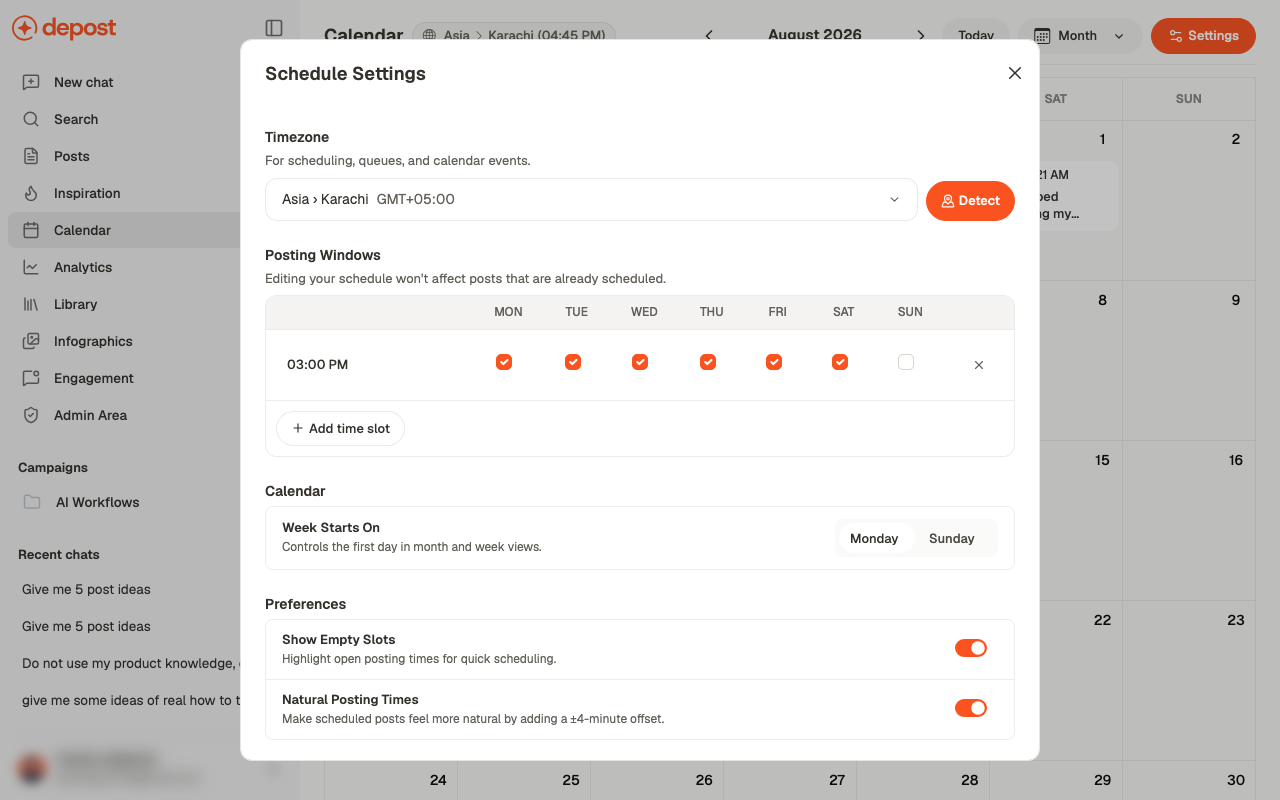
Open **Settings** on the calendar. Everything about *when* posts go out lives here.
 ## Timezone
Used for scheduling, queues, and calendar events. **Detect** sets it from your device.
Get this right before scheduling anything. Every time you set afterwards is interpreted
against it, and correcting it later doesn't move posts already scheduled.
## Posting windows
A grid of times against days. Add a time with **Add time slot**, then tick the days it
applies to. That combination is your queue: the recurring slots a post can be dropped into
without picking a time by hand.
Editing your schedule doesn't affect posts that are already scheduled. Changing a window
changes where *future* posts land, not where existing ones sit.
Start with fewer slots than you think you'll fill. An empty slot is a reproach; a full
schedule of three a week beats a half-empty one of ten.
## Week Starts On
**Monday** or **Sunday**, for month and week views. Cosmetic, but worth matching however
your team already thinks about a week.
## Preferences
| Setting | What it does |
| ------------------------- | ------------------------------------------------------------------------------------ |
| **Show Empty Slots** | Highlights open posting times on the calendar, so gaps are visible and quick to fill |
| **Natural Posting Times** | Adds a ±4-minute offset to scheduled posts |
**Natural Posting Times** is worth leaving on. Posts landing at exactly 09:00 every day
look machine-timed. A few minutes of drift costs nothing and reads as a person publishing.
## Related
Where these settings take effect.
Using a queue slot instead of a fixed time.
## Timezone
Used for scheduling, queues, and calendar events. **Detect** sets it from your device.
Get this right before scheduling anything. Every time you set afterwards is interpreted
against it, and correcting it later doesn't move posts already scheduled.
## Posting windows
A grid of times against days. Add a time with **Add time slot**, then tick the days it
applies to. That combination is your queue: the recurring slots a post can be dropped into
without picking a time by hand.
Editing your schedule doesn't affect posts that are already scheduled. Changing a window
changes where *future* posts land, not where existing ones sit.
Start with fewer slots than you think you'll fill. An empty slot is a reproach; a full
schedule of three a week beats a half-empty one of ten.
## Week Starts On
**Monday** or **Sunday**, for month and week views. Cosmetic, but worth matching however
your team already thinks about a week.
## Preferences
| Setting | What it does |
| ------------------------- | ------------------------------------------------------------------------------------ |
| **Show Empty Slots** | Highlights open posting times on the calendar, so gaps are visible and quick to fill |
| **Natural Posting Times** | Adds a ±4-minute offset to scheduled posts |
**Natural Posting Times** is worth leaving on. Posts landing at exactly 09:00 every day
look machine-timed. A few minutes of drift costs nothing and reads as a person publishing.
## Related
Where these settings take effect.
Using a queue slot instead of a fixed time.